Order errors and rejections
An order can be refused before it leaves, by the platform, or after, by the venue. This page explains the most common messages, what they mean and what to do.
Where to find it
Messages appear as notices (toasts) in the corner of the screen, in the ticket itself or in the DOM, and are logged in the Activity tab as Order rejected. For a step-by-step diagnosis, see Order rejected.
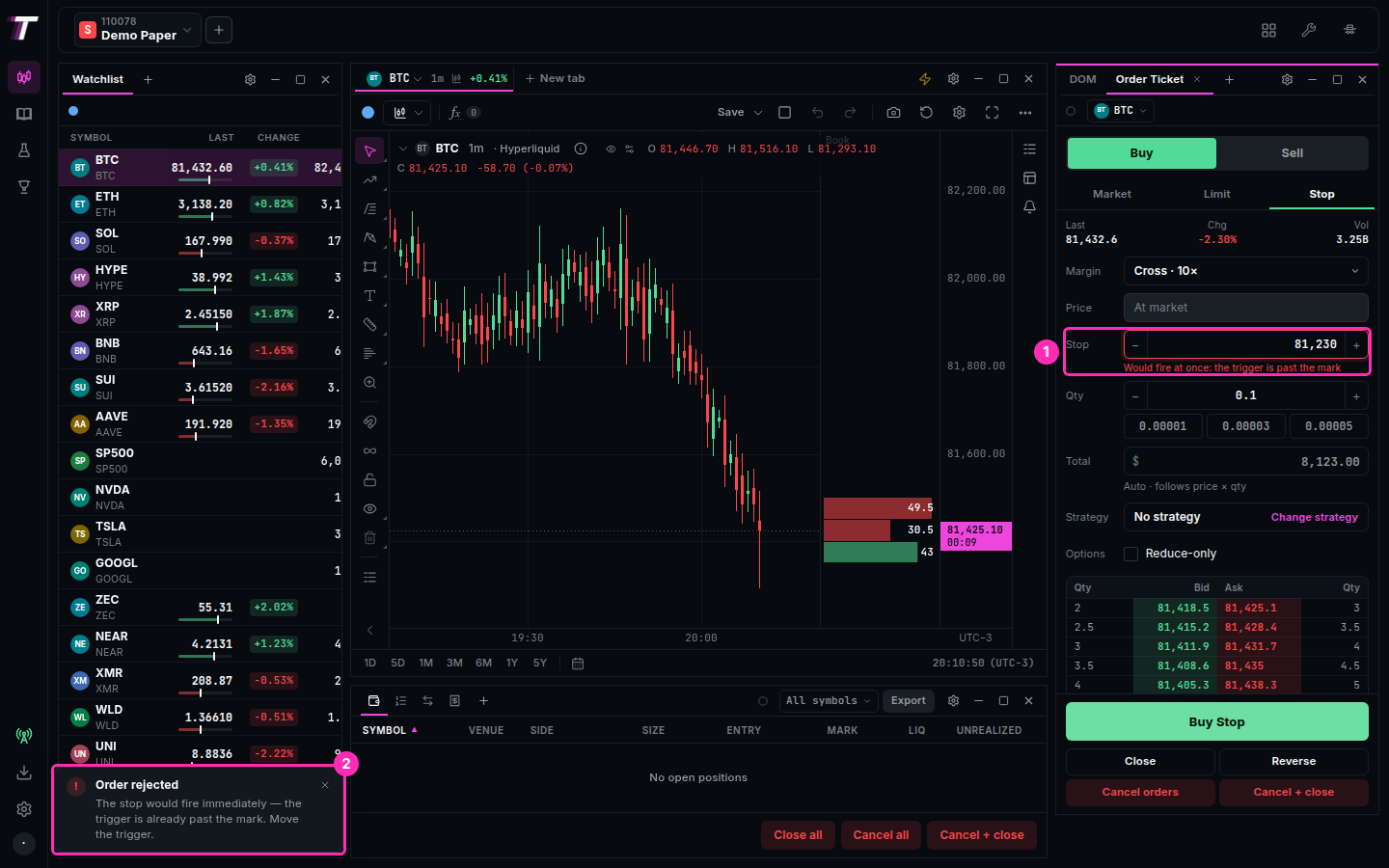
1 Warning under the Stop field · 2 Order rejected notice
Rejection before sending
| Message | Cause | What to do |
|---|---|---|
| Set the quantity first / Invalid quantity | Empty, zero or off-step quantity | Enter a quantity greater than 0 |
| Set the price first | Limit or stop order with no price | Fill in the price |
| Stop would fire immediately | The trigger is already past the reference price (mark) | Move the trigger to the right side (above for a buy, below for a sell) or send at market |
| Market closed: opening orders are refused until the session opens. | The market's session is over | Wait for reopening; orders that only reduce a position can still be sent |
| This account can only trade on {venues} / Not allowed: {name} isn't enabled for your account's trading group | The account has no access to that venue or symbol | Switch account or symbol |
| Leverage above the {cap}× limit for this symbol | Leverage above the maximum | Lower the leverage |
| Insufficient margin — need {amount} more for this order | Available margin is less than required | Reduce the size or free up margin |
Rejection by the venue or by risk
- Rejected by the venue — the venue refused the order; the message carries the reason.
- Stop would fire immediately — its trigger is already past the mark. Use a market order, or move the trigger. — the venue refused a stop whose trigger had already passed the mark. This message appears in English. Move the trigger or send at market.
- Reduce-only order rejected — the Reduce-only order would open or add to a position instead of reducing one.
- Liq band — the position is close to liquidation and opening more on that side is refused; reduce or close.
- Trading is blocked by your risk guard. You can still close or reduce positions. — a risk limit was reached. See Account locked and suspension and Enforced risk limits.
- Prop breach blocked — the order would violate an evaluation account rule.
- Live trading supports Hyperliquid perps + Aster perps — live accounts only trade on those venues; today live accounts are coming soon.
- Trail orders aren't supported live on Hyperliquid — use Aster or a paper account.
- Venue not connected — the trading agent still needs approval. See Trading agents.
Uncertain outcome
If the platform cannot confirm what happened (for example, the connection dropped while sending), the order does not show as rejected. You see Confirming order: the order may have reached the venue and stays visible while its state is confirmed. Before resending, check Orders and Activity. If an earlier order is still unconfirmed, the platform asks you to check the history before submitting another. A market order that executes in part shows Partial fill, and the remainder is discarded.
Frequently asked questions
I double-clicked and only one order went out? Yes. A 150 ms guard prevents duplicating the order on a double click.
I got "Network error — check your connection." Check your connection and look at Positions and Orders before trying again.