Statement
The Statement is the ledger of your active account: every movement of the balance as one signed line (deposits, withdrawals, payouts, transfers, fees and funding), plus one Trading result line per day, in date order. It answers the question "where did the balance go?", separate from orders and trades.
Where to find it
Add the Statement tool from the picker (Add tool > Statement) or open the Statement tab in the trading tables. See Positions, orders and trades tables.
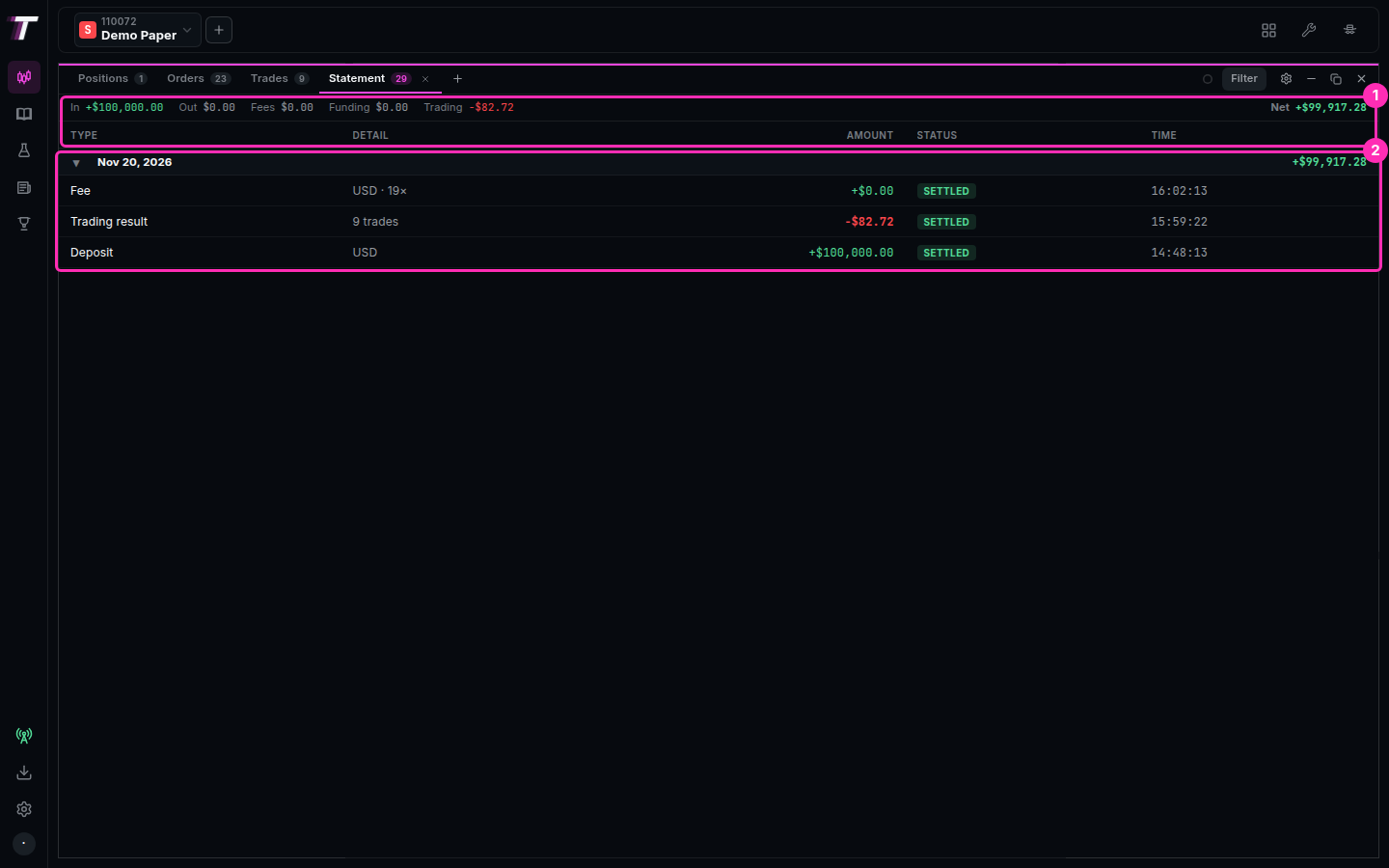
1 Totals strip and Statement columns · 2 Entries
Columns
| Column | What it shows |
|---|---|
| Time | When the entry happened |
| Type | The nature of the entry (see below) |
| Amount | Amount credited (+) or debited (−) |
| Status | Pending, Settled or Failed |
| Detail | Extra information: the asset, how many fees an entry sums ("USDC · 3×"), or how many trades closed that day ("3 trades") |
Drag a column's edge to resize it. Entries are grouped by day; each day's band shows the day's net. Use Collapse day and Expand day to organize the list. The balance is not shown in the Statement.
Entry types
- Deposit and Withdrawal — funds coming in and going out.
- Payout, Payout fee and Programme fee — payouts and the fees tied to them or to the programme.
- Fee — fees charged.
- Funding — funding payments and receipts on perpetuals.
- Internal transfer, Spot transfer, Transfer (in) and Transfer (out) — movements between the venue's accounts and wallets.
- Adjustment — adjustments that do not fit the types above.
- Trading result — one line per day with the gross realized P&L of the trades closed that day; fees stay as their own lines, so nothing is counted twice.
Filter and totals
The Filter button opens the Period (Today, 7D, 30D or All), From and Until, and the Type chips: Deposits, Withdrawals, Payouts, Transfers, Fees, Funding, Trading and Adjustments. With no entries in the window you see No entries in the period. A strip titled Totals of the lines listed adds up what is shown: In, Out, Fees, Funding, Trading and Net. A withdrawal you just requested shows up right away as a pending entry and becomes Settled when the venue completes it.
Export
As in the other tables, Export produces Download CSV, Download Excel or Download PDF with the visible entries. If the list was limited, the file is marked Partial export — not a complete record.
Frequently asked questions
Does the Statement show the result of my trades? Only as one Trading result line per day. Each trade's result is in the Trades tab.
Do paper accounts have a Statement? Yes, with the account's fictional balance. Paper accounts do not move real funds; see Paper and live accounts.