Order types
Tron Charts offers Market, Limit and Stop orders. Which of them appear depends on the symbol's venue: the ticket shows only the types the venue accepts, instead of letting you try and get an error.
Where to find it
In the Pad view of the Order pad, each type has its own button (Buy Market, Buy Limit, Buy Stop and the sell ones). In the Order Ticket, the type comes from the tab. In the DOM and on the chart, the type is set by the price position.
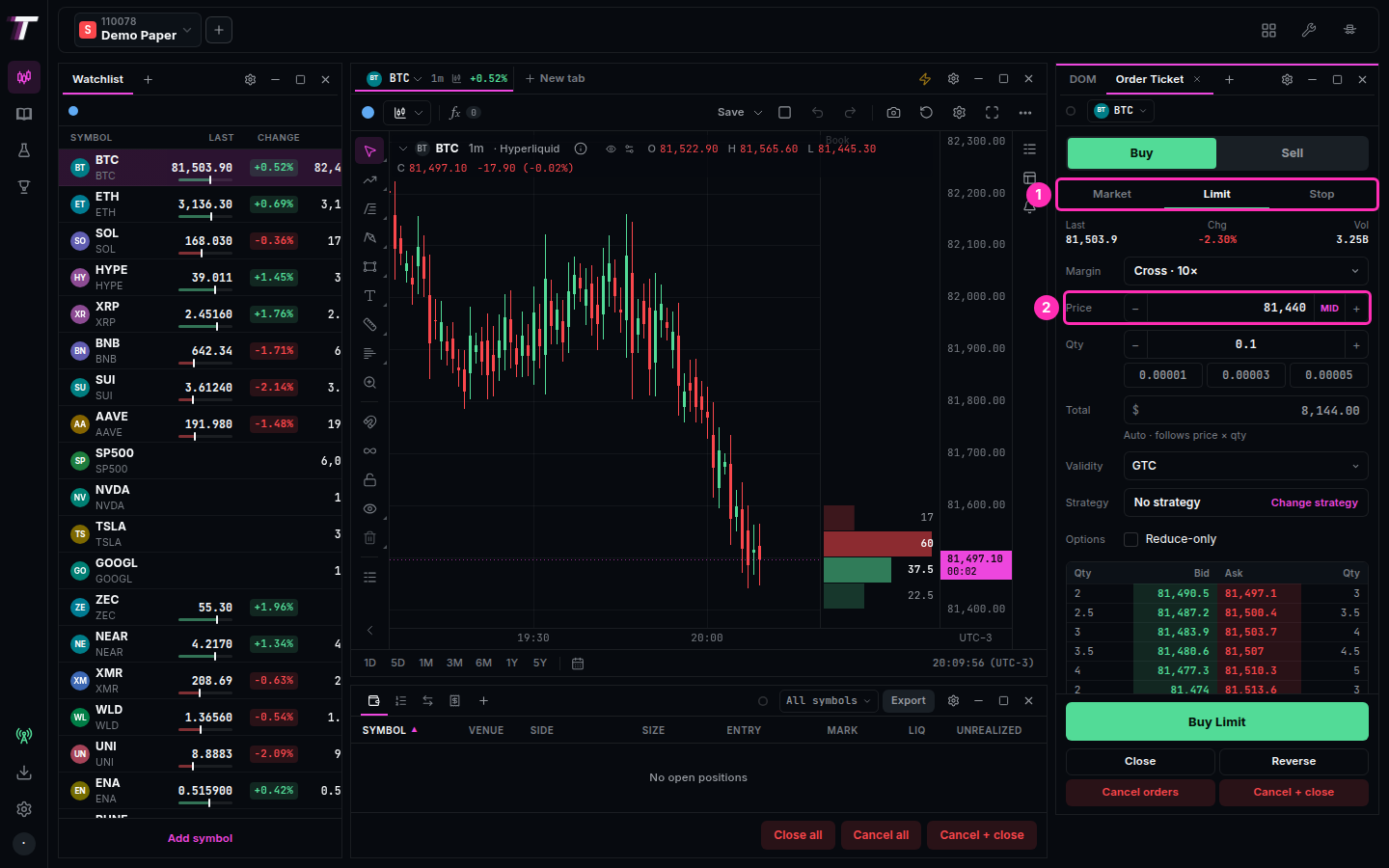
1 Order type: Market, Limit and Stop · 2 Limit price
The three types
- Market — executes right away at the best available price. Fast, but the final price may differ from what you saw.
- Limit — executes at the price you set or better. If the market has not reached it, the order rests in the book until it fills or is cancelled. It accepts a validity (TIF).
- Stop — stays idle until price reaches the trigger; then it fires a market order. The Stop Limit tab of the Order Ticket adds a limit price to the trigger, and appears only on live accounts on Hyperliquid and Aster; on a paper account the stop is always a market stop.
Take-profit is a stop on the profit side, so it is not a separate type: you create it as a stop on the favorable side or with brackets.
Types by venue
| Venue | Available types |
|---|---|
| Hyperliquid, Aster, Lighter | Market, Limit, Stop |
| Paper account, LSE, T4 | Market, Limit, Stop |
| B3 | Market, Limit, Stop-limit |
Which venues you can use depends on what your operator has enabled; today only Hyperliquid and Aster execute live. If the venue is unknown, the ticket offers only Market and Limit. Trail (trailing stop) does not work live on Hyperliquid; Aster supports it.
Price rules
- A buy stop sits above the reference price (mark); a sell stop sits below. A stop that has already passed the mark is blocked with Stop would fire immediately.
- A limit order that crosses the market executes right away, as a market order. On the chart, you see the Marketable notice.
- Reduce-only guarantees the order only decreases your position.
Important: live execution exists only on Hyperliquid and Aster, and live accounts are coming soon. Today the types apply to orders on a paper account.
Frequently asked questions
Why do I not see Stop on my symbol? Its venue does not offer Stop: B3 uses Stop-limit, and an unknown venue offers only Market and Limit.
What is the difference between Stop and Stop-limit? The stop fires a market order; the stop-limit fires a limit order at the price you define.