TP/SL brackets and OCO
A bracket is a pair of protection orders, Take Profit (TP) and Stop Loss (SL), that attaches automatically when the main order fills. The TP closes at the target; the SL caps the loss. The two legs work as OCO: when one executes, the other is cancelled.
Where to find it
- Order pad — under Options, check TP / SL and set TP and SL in ticks, or pick a saved strategy in Strategy. See Order pad.
- Order Ticket — the Strategy row picks a saved strategy (Change strategy, Edit strategies, New strategy); see Order Ticket.
- DOM and Flash — the Strategies button opens the Trading Strategy Editor.
- Chart — drag from the order or position line to create TP and SL. See Trading from the chart.
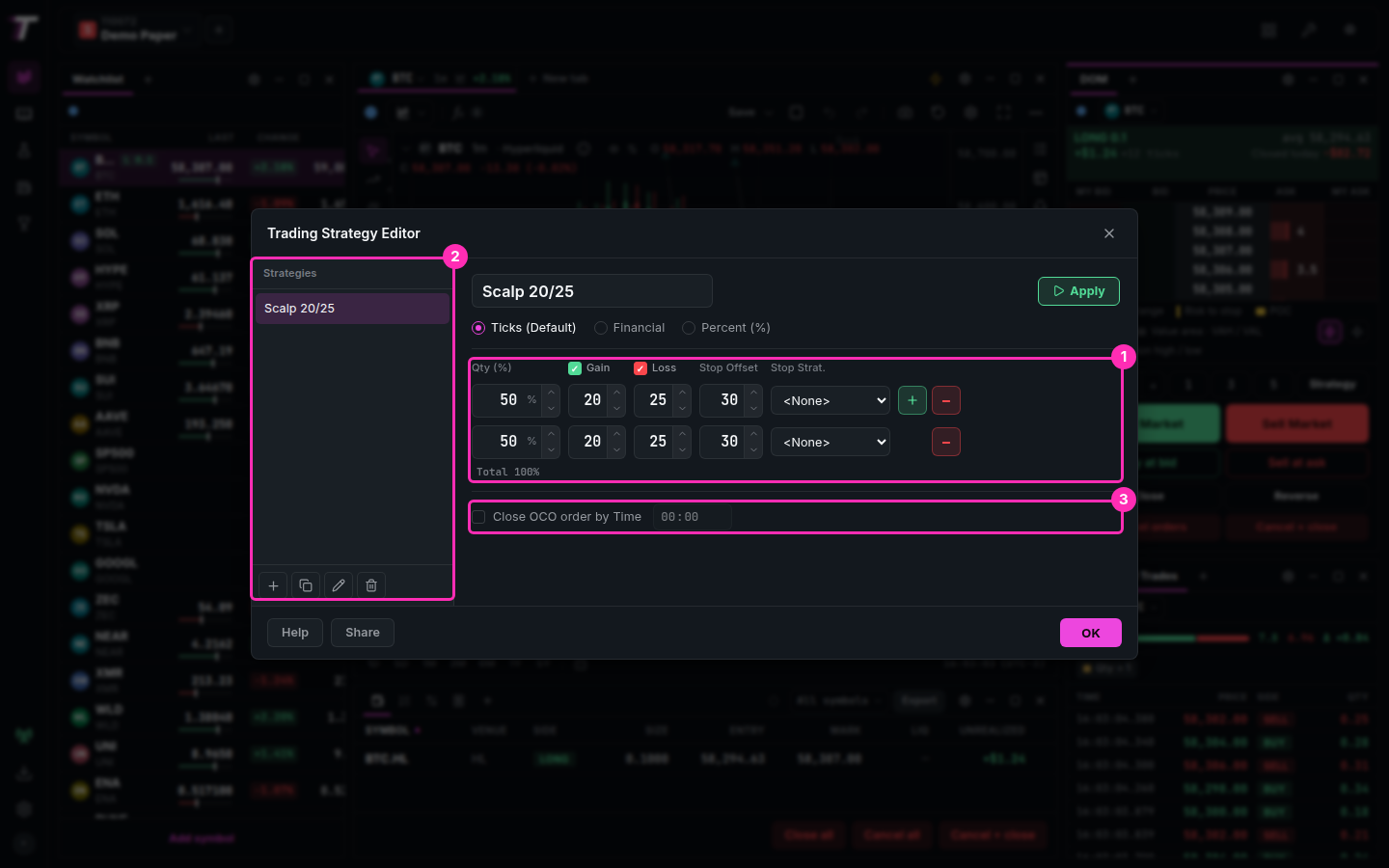
1 Bracket Gain and Loss lines · 2 Strategies list · 3 Close OCO order by time
Leg direction
For a buy, the TP sits above and the SL below the order price. For a sell, it is the opposite. If the TP or the SL is missing when you build the bracket, the ticket warns you: Set both a take-profit and a stop-loss price.
Strategies (Gain/Loss)
In the Trading Strategy Editor you create a New strategy with Gain (Take-Profit) and Loss (Stop-Loss) lines. The lines split the position and the total must add up to 100%.
| Option | What it does |
|---|---|
| Bracket unit | Ticks (Default), Financial or Percent (%) |
| Qty (%) | Share of the position each line covers; up to five TP levels |
| Stop Strat. | , Breakeven or Trailing, with Stop Offset |
| Close OCO order by Time | Ends the protection orders at a set time |
If the total goes above 100%, you see Sum above 100%: lines will be scaled down proportionally. If it falls short, Partial cover: X% of the position has no target. Apply arms the strategy; it then attaches brackets to the next orders until you use Stop. Sharing strategies is coming soon.
How brackets behave
- Attach on fill — the legs only exist after the main order executes.
- Proportional size — if the position size changes, the legs follow.
- Modify — on Hyperliquid and Aster, the app cancels the old legs and attaches new ones.
- Crossed the market — a leg placed beyond the current price executes right away, at market. On a paper account, if the TP executes right at attach and closes the position, the SL leg is cancelled by OCO and the bracket is reported as placed, not as an error.
- Market orders only — the strategy's stop and target (or TP / SL) go out with Market orders only, and not with reduce-only ones; Before you send says what goes out.
- Dragging on the chart — under Settings > Trading, Bracket children follow parent drag makes TP and SL follow the main order when you drag it.
Important: Trail orders do not use brackets. To set TP and SL, use Market, Limit or Stop.
Frequently asked questions
Does a bracket protect a position that already exists? Brackets attach when an order fills. To protect an open position, drag from the position line on the chart or in the DOM.
Can I have more than one target? Yes, up to five TP levels per strategy.