Flash (scalper bar)
Flash is a floating bar over the chart for fast trading: one click sends a market order or a limit at the best price, and dedicated buttons close positions and cancel orders. It is designed for scalping.
Where to find it
In the chart header, click the yellow lightning bolt (Flash scalper). A filled bolt means the bar is on; click again to turn it off. Each chart has its own bar, with its own asset, quantity and position. The tool picker also has Flash (Add tool > Flash), which opens a chart with the bar already on.
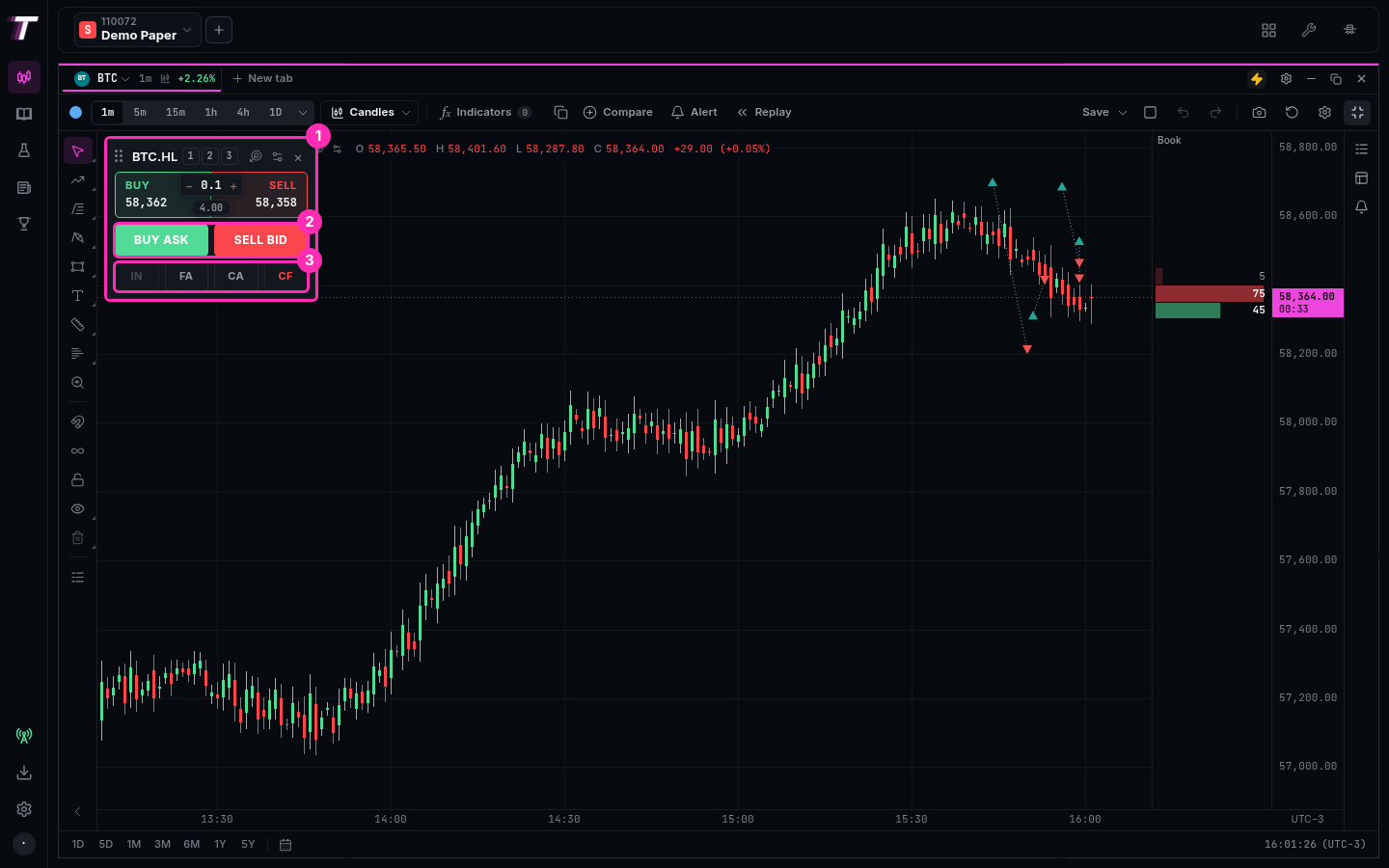
1 Flash bar over the chart · 2 BUY ASK and SELL BID · 3 IN, FA, CA and CF
The buttons
| Button | What it does |
|---|---|
| Qty with − and + | Sets the quantity; it is the same as the DOM's and the chart menu's |
| BUY / SELL | Market order, with ask, spread and bid on the bar itself |
| BUY ASK / SELL BID | Limit at the current ask or bid |
| IN | Invert (reverse) the position |
| FA | Close all positions |
| CA | Cancel all orders |
| CF | Cancel all orders and close all positions |
The limit needs a book. Without a book, you see No book — use BUY/SELL at market. With confirmation on, the click asks, for example, "Buy 1 BTC at market?" before sending; see Order pad for the Submit mode.
Flash settings
The bar's gear (Configure) opens Flash settings:
- Shortcuts and Show qty shortcuts — ready-made quantity buttons.
- Visible buttons — choose which buttons the bar shows.
- Presets per asset — quantity shortcuts and the +/− step per asset. A root contract (for example WIN or WINFUT) covers every expiry; with no per-asset setup, the global shortcuts apply.
The bar is draggable (Drag to reposition) and resizable, and its position is saved per chart. The bar's Strategies button arms a TP/SL strategy; see Brackets.
Important: Flash sends orders with one click. Check the active account and the quantity before using it. Today only paper accounts trade.
Frequently asked questions
Does Flash appear in the tool list? Yes. Add tool > Flash opens a chart with the bar already on; on any other chart, the bolt turns it on.
Do FA, CA and CF affect only this chart? They close positions and cancel orders of the active account, not only the chart's symbol. See Flatten, reverse and cancel all.