Keyboard shortcuts
Shortcuts let you trade and arrange the screen without the mouse. All of them can be reconfigured, and the defaults below hold until you change them.
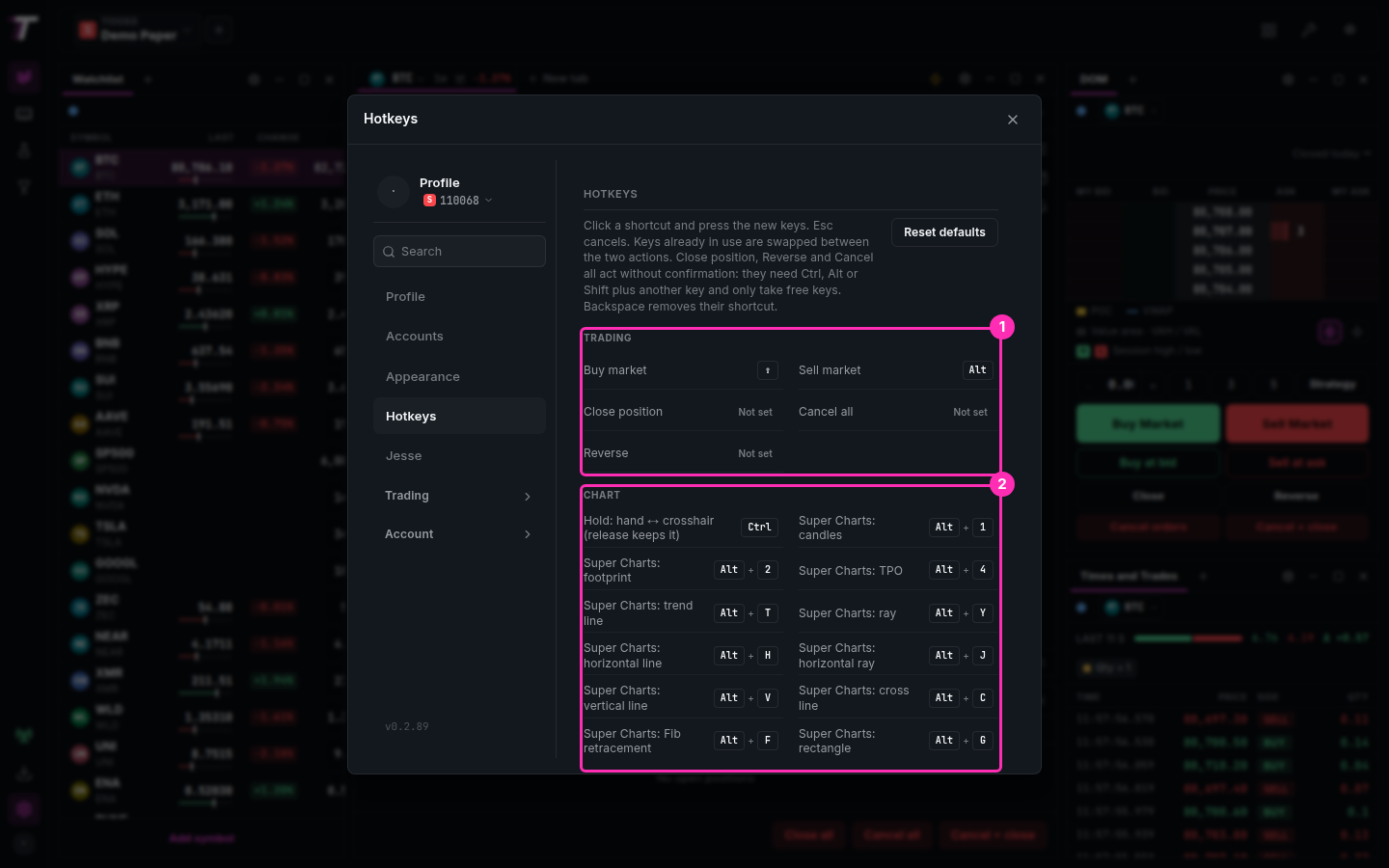
1 Trading · 2 Chart
Where to find it
- List and reconfigure — Settings > Hotkeys, or the Keyboard shortcuts link at the bottom of the Add a tool window. The screen lists every action with its keys and Reset defaults.
- Search —
/(outside text fields) opens Spotlight.
Important:
Shiftalone buys at market andAltalone sells at market, with no other key. In Settings > Trading > Trading, turn on Confirm before placing orders to add a confirmation.
Trading and chart
| Action | Default shortcut |
|---|---|
| Buy at market (last quantity) | Shift |
| Sell at market (last quantity) | Alt |
| Close position | no key set |
| Cancel all orders | no key set |
| Reverse position | no key set |
| Toggle hand and crosshair on the chart | Hold Ctrl (releasing keeps it) |
| Super Charts tools | Alt + a key, such as Alt+T (trend line) or Alt+1 (candles) |
Close position, Cancel all and Reverse send orders with no confirmation, so they start with no key. You choose one under Settings > Hotkeys, and it must be a combination with Ctrl, Alt or Shift (a lone key is refused).
Workspaces
| Action | Default shortcut |
|---|---|
| Save workspaces | Ctrl+S |
| Go to workspace 1 to 9 | Ctrl+1 to Ctrl+9 |
Windows
| Action | Default shortcut |
|---|---|
| Dock left, right, top, bottom half | Ctrl+Alt + arrows |
| Dock top-left, top-right, bottom-left, bottom-right | Ctrl+Alt+U, I, J, K |
| Toggle maximize | Ctrl+Alt+Enter |
| Minimize the focused window | Ctrl+Alt+M |
| Tile all windows | Ctrl+Alt+G |
| Window switcher | ⌘ + ` |
| Close the focused tool | Ctrl+W |
Help and search
| Action | Default shortcut |
|---|---|
| Open Spotlight | / or Ctrl+K (⌘K on Mac) |
How shortcuts behave
- Order shortcuts do not fire while you are typing in a text field.
- Holding a key does not repeat the order: each shortcut sends one order only.
- Where the default uses
Ctrl, the Mac⌘also works.
Reconfigure
- Open Settings > Hotkeys.
- Click the action's key chip and press the new combination (such as
Ctrl+YorAlt+2), or justShift,AltorCtrl. Esccancels. If the combination is already in use, the two actions swap keys.- Reset defaults returns to the original.
Under Pointer modifiers you choose the keys used when dragging windows: free place (default Shift) and re-attach to layout (default ⌘).
Frequently asked questions
I sent an order by accident with Shift. Turn on confirmations under Trading or change the buy key.
Shortcuts do not work. Check that focus is not in a text field.