Tools catalog
Tools are the building blocks of your workspace: charts, order pad, DOM, position tables and more. Any of them can be opened as a window or as a pane tab.
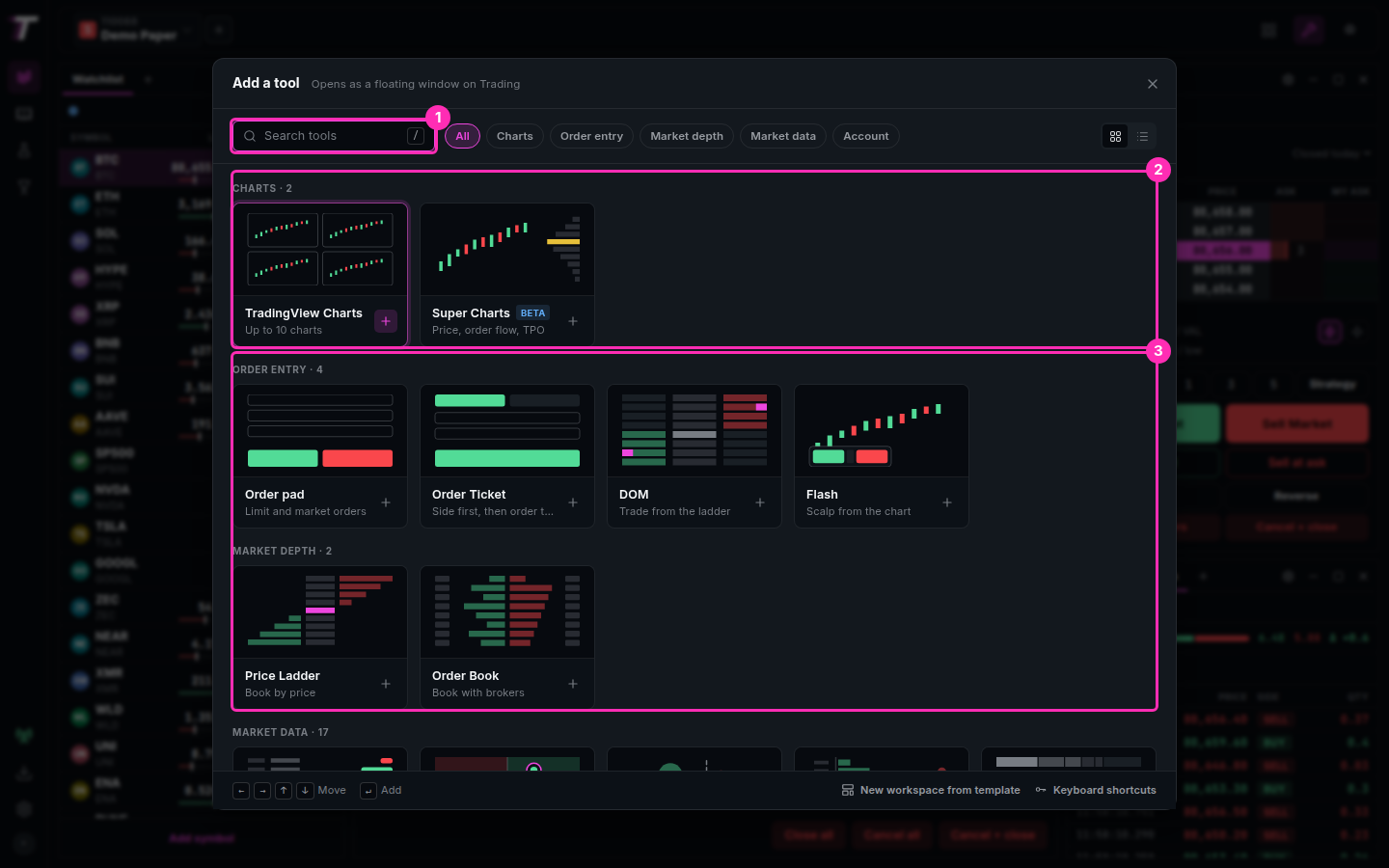
1 Tool search · 2 TradingView Charts and Super Charts · 3 Other tools
Where to find it
- Tools button in the header (on Trade and on Journal; each has its own catalog), with the Search tools field.
- Add tool — the
+on a pane or window tab bar. - Tool options — the tool's gear opens that tool's Settings, with saved presets.
Available tools
| Tool | What it is for |
|---|---|
| TradingView Charts | Full chart with drawings and indicators. See TradingView charts |
| Super Charts (Beta) | The platform's own chart: price, order flow, TPO. See Super Charts overview |
| Order pad | Order entry, with the Pad and Ticket views. See Order pad |
| DOM | Price ladder with depth. See DOM ladder |
| Price Ladder | Sum of all lots at each price level |
| Order Book | Each individual offer, one order per row |
| Times and Trades | Every print and side |
| Smart money | Net long and short of the best wallets |
| Liquidations | Forced closes, longs against shorts |
| OI regime | Price against open interest: who is building |
| Whale positions | Big wallets, entry, leverage, liquidation |
| Market makers | Who makes the market, and who is run over |
| Top Traders | Who buys and sells most, by wallet |
| Market Health | Wallet count and concentration |
| Watched wallets | Live prints of the wallets you watch |
| Venue Depth | Where a size fills best |
| Funding board | Funding rates on every venue, side by side |
| Volume at Price | Volume traded at each price level of the session |
| Volume at Market | Resting quantity and queue renewals per price |
| Watchlist | Your symbols with price and change. See Watchlist |
| Market Map | Map view of a list of assets |
| News | Headlines with Trade buttons; only shows if the operator turned the module on |
| Economic Calendar | Macro events by day |
| Positions | Open positions, with P&L and liquidation price |
| Orders | Working orders |
| Trades | Fills already executed |
| Statement | Funding and fees, and every other movement of the balance |
| Review inbox | Review closed trades and note open positions |
| Plan and guardrails | Today's plan and how far the day is from its limits |
| Behaviour guardrails | Behaviour rules and the account's risk guard today |
Each tool has its own picture in the picker. Review inbox, Plan and guardrails and Behaviour guardrails depend on the Journal being on.
Availability: Super Charts is on by default and the operator can turn it off. News is off by default.
Journal tools
On Journal, the catalog lists the Journal's own tools, in the groups Review, Trades, Performance, Calendar, Notes, Context and Planning. See Workspaces and tools.
| Tool | What it is for |
|---|---|
| Day summary | The day's numbers and trades |
| Day notes | Mood, energy, notes and screenshots |
| Rules | Your rules kept, day by day |
| Weekly report card | The week on one page |
| Trade log | Every trade, filtered and sorted |
| Trade replay | The trade on its chart, read-only |
| Trade review | The trade's facts, MAE / MFE and your review of it |
| MAE / MFE | What you left on the table |
| Execution quality | Fees, cancels, time to fill |
| Funding and fees | Cost of carry |
| Risk and leverage | Risk % and leverage at entry |
| KPI strip | The numbers that matter |
| Equity | The curve, net of fees |
| Breakdowns | Net by setup, hour or symbol |
| R distribution | Real R, with its coverage |
| Streaks | Your current win or loss run |
| Findings | Patterns with sample size |
| Mood and results | What you write, measured |
| Hour × weekday | When you trade well |
| Monthly returns | Months and years |
| Edge monitor | Is the edge holding |
| Compare | A against B |
| Monte Carlo | Drawdown and risk of ruin |
| By account | Net, trades, win rate and drawdown per account, and combined |
| Month calendar | Net per day, the month at a glance |
| Goals | Your goals for the day, week or month and how close you are |
| Setups | Your setups, their criteria and how their trades did |
| Daily plan | The plan of the day picked and how the day kept to it |
| Market context | Volatility, trend and range days |
| Around the news | High-impact events |
| Notes | Notes of the day or trade picked, or every note |
| Note templates | Skeletons your notes start from |
Flash is not a tool
The Flash (scalper) bar appears over the chart. Turn it on with the Flash scalper switch in the chart pane header. See Flash scalper bar.
Limits
Up to 10 charts per workspace and 4 instances of each other tool. When there is no more room, the catalog shows Limit reached.
Frequently asked questions
Where is the predictions tool? The prediction pad is not in the current catalog.
Why is a tool missing? It may depend on a module the operator did not turn on.