Account blocked and suspension
When the platform's risk management detects that an account broke a rule, it blocks the account, closes open positions and starts refusing new orders. This article explains the Account blocked card, the possible reasons and when the block lifts.
Availability: the risk-management block depends on the rules turned on by the platform or the account's operator, such as the ones for funded (Funded/Prop) accounts. Available depending on the platform/operator.
Where to find it
- The Account blocked card (or Account blocked until the next session) that appears when you open the blocked account.
- Accounts panel — the account shows the Blocked badge and the Blocked by risk management state.
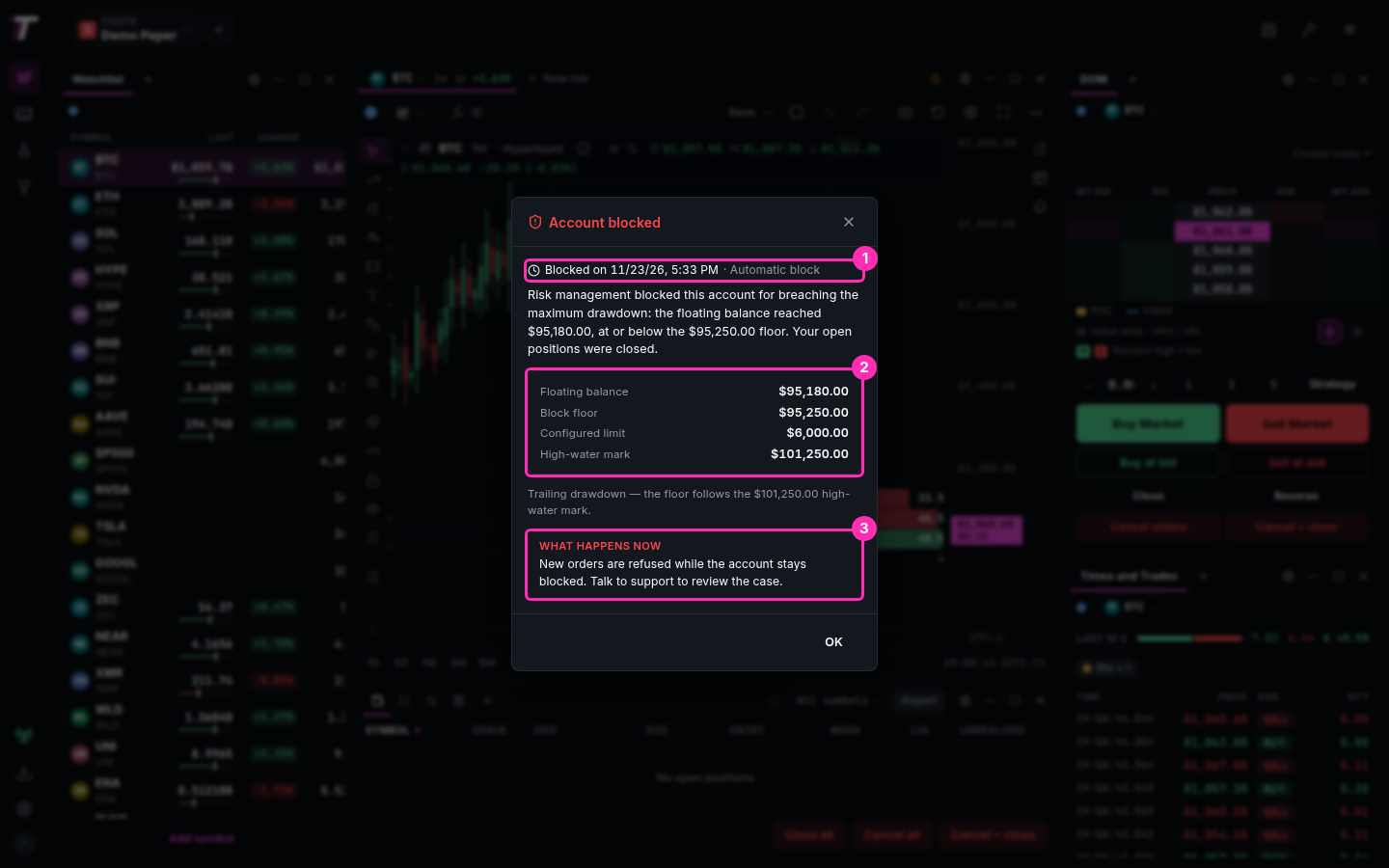
1 When and by whom the account was blocked · 2 Block numbers · 3 What happens now
Account states
- Active — trades normally.
- Paused by your own risk limit — you set a personal limit with a block and it was reached; this is your rule, not the platform's.
- Blocked by risk management — the platform blocked the account.
What the card shows
| Item | Meaning |
|---|---|
| Floating balance | Account balance including the result of open positions. |
| Block floor | Value below which the account is blocked. |
| Configured limit | The limit of the rule that was broken. |
| High-water mark | Highest equity recorded, used by trailing drawdown. |
| Reported by risk management | Text sent by the rule that triggered the block. |
Reasons and floor types
The block happens for breaching the maximum drawdown or breaching the daily loss limit. The floor depends on the drawdown type:
- Trailing drawdown — the floor follows the equity high-water mark (HWM).
- End of day (EOD) — the floor is measured from the end-of-day balance.
- Static — fixed floor, measured from the starting balance.
See how equity and the HWM enter this calculation in Drawdown, equity and HWM.
Source and duration
The source appears on the card: Automatic block, Blocked by the provider or Blocked by an operator.
- Block until the next session — lifts by itself: the account reopens at the next session. Until then, new orders are refused.
- Block that needs support — new orders are refused while the account stays blocked. Talk to support to review the case.
While the account is blocked, closing an open position still works. The card's OK button only dismisses the notice; the account stays blocked.
Important: the automatic block closes your open positions the moment it triggers.
Frequently asked questions
Are my own limits and the platform block the same thing? No. Your limits are a personal choice and run in the browser; the platform block comes from the server.
How do I know a block lifts by itself? The title reads Account blocked until the next session.