Loss and profit limits
Personal limits are your per-account discipline barrier: you set how much you accept to lose or win in a day and what Tron Charts should do when the result gets there. They do not replace platform rules; they apply only to you, in this browser.
Where to find it
- Settings > Trading > Risk limits — one block per account, headed by the account name, with a switch to turn it on or off.
- Account stats menu (the button next to the account selector) — the gear beside Daily loss limit or Profit target (Edit risk limits) opens this screen; when limits are off you see Risk limits off with an Enable button.
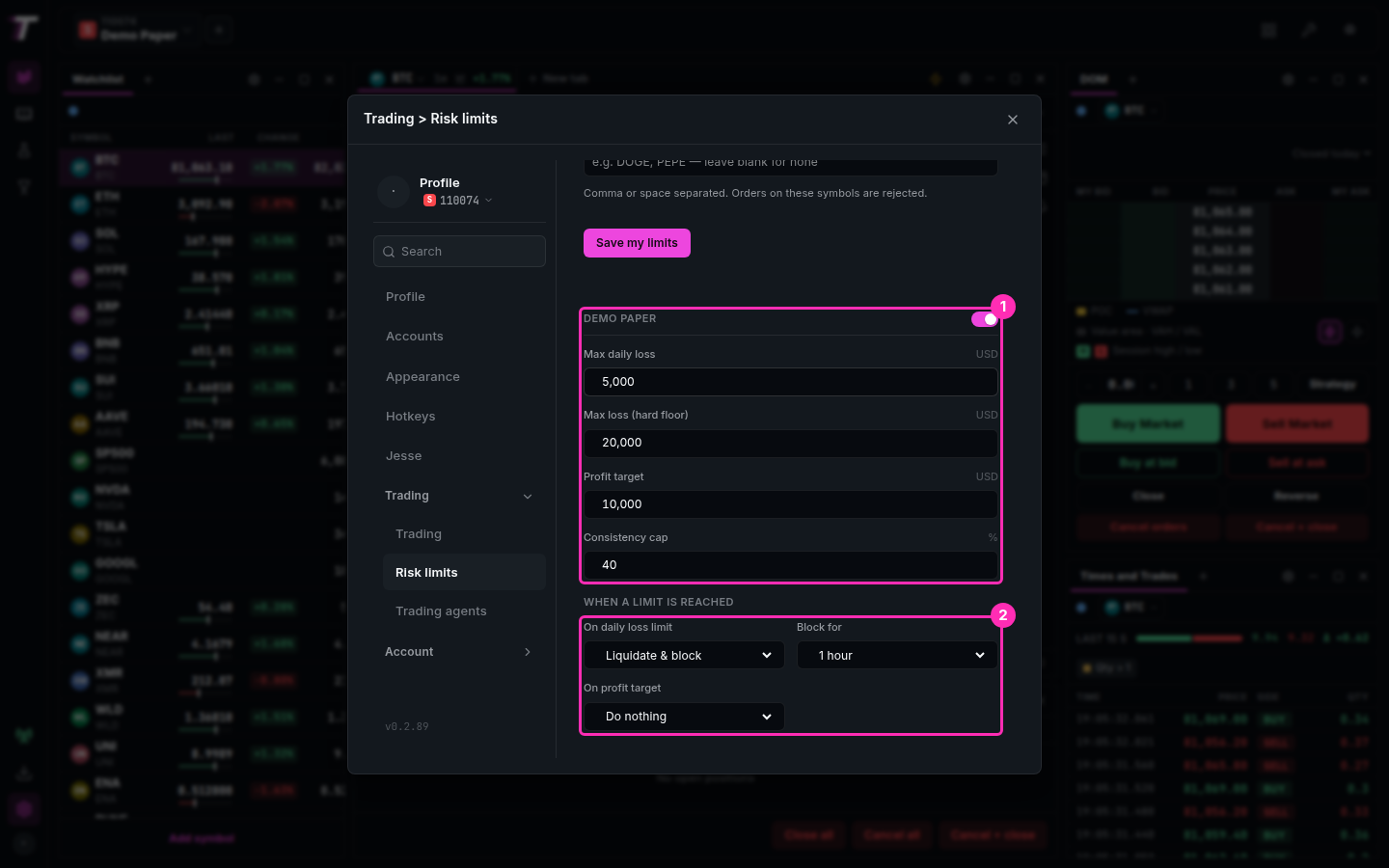
1 Account block: switch and the four fields · 2 When a limit is reached: action and Block for
Parameters
| Field | Unit | Meaning |
|---|---|---|
| Max daily loss | USD | Triggers the chosen action when the day's result reaches this loss. |
| Max loss (hard floor) | USD | Absolute loss floor for the account. Feeds the Journal's loss-room indicators; it triggers no action. |
| Profit target | USD | Triggers the chosen action when the day's result reaches this profit. |
| Consistency cap | % | No single day should exceed this share of total profit. Feeds the Journal's consistency indicators; it triggers no action. |
The day's result is today's realized result plus the open result of the active account. In this version the limit watches the active account only.
When a limit is reached
Actions exist for Max daily loss (On daily loss limit) and Profit target (On profit target):
- Do nothing — default; nothing happens.
- Pop up alert — shows a notice only, positions stay untouched.
- Liquidate — flattens all positions and cancels all working orders.
- Liquidate & block — does the same and blocks new entries for the Block for time: 30 min, 1 hour, 2 hours, 4 hours, This session (until the next midnight UTC) or Other… (you enter the minutes).
The block survives a page reload: refreshing the tab does not release entries. During the block the account shows as Paused by your own risk limit and the panel shows Resumes in with the time left. Orders that only reduce a position still go through, and trying to open one shows Blocked by risk limit.
Important: personal limits run in the browser and only evaluate while the app is open. For a barrier the server applies to every order, use enforced limits.
Frequently asked questions
Does each limit fire more than once a day? The alert or liquidation fires once per limit per day. If you reload the page, an active block stays in force and is not redone.
Can I still place orders to close a position during the block? Yes. The block only stops orders that open or increase a position.