My order was rejected
A rejected order is refused before it is executed, and the app shows the Order rejected notice with the reason. Use the table below to find the cause from the message.
Symptom
- Order rejected appears when you send, modify or cancel (Modify rejected, Cancel rejected).
- The send button is disabled with a notice on the ticket.
- The order does not appear in open orders.
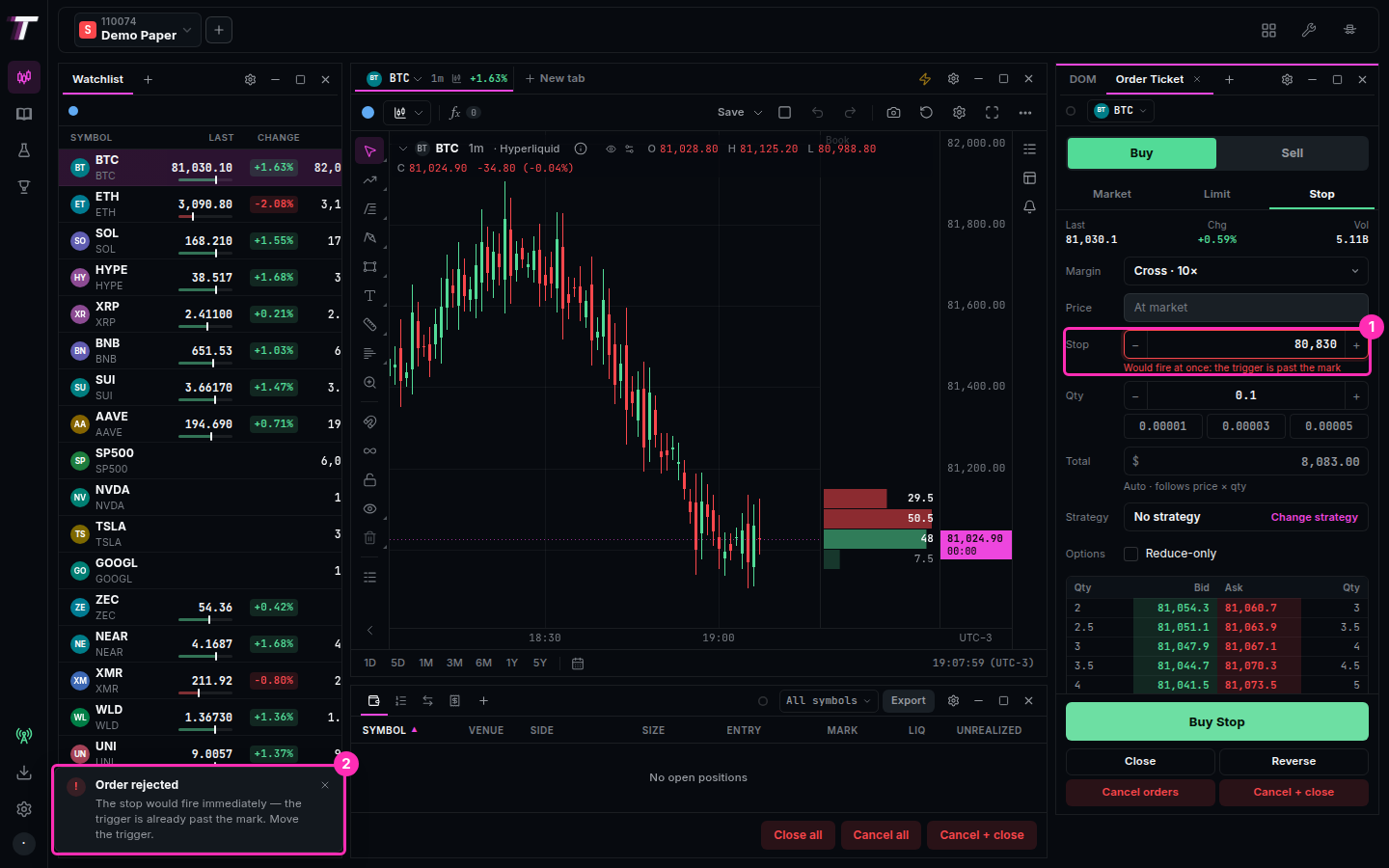
1 Warning under the Stop field · 2 Order rejected notice
Likely causes
| Message or situation | Cause | What to do |
|---|---|---|
| The stop would fire immediately — the trigger is already past the mark. Move the trigger. | Buy stop below the mark or sell stop above it. | Move the trigger: above the mark for a buy, below for a sell; or use a market order. |
| Stop would fire immediately — its trigger is already past the mark. Use a market order, or move the trigger. | The venue refused a stop already past the mark (message in English). | Move the trigger or use a market order. |
| Market closed / Market closed: opening orders are refused until the session opens. | Trading session closed. | Wait for it to reopen; orders that only reduce a position (reduce-only) still go through. |
| Reduce-only rejection | The reduce-only order would open or add to a position. | Uncheck Reduce-only or adjust the side and size. |
| Insufficient margin — need … more for this order. | Available margin is lower than required. | Lower the size or leverage, or free margin. |
| Leverage above the …× limit for this symbol. | Leverage above the symbol's cap. | Lower the leverage. It must be a whole number. |
| This account can only trade on … / Not allowed: … isn't enabled for your account's trading group. | The venue or symbol is outside your account's group. | Pick a symbol from the allowed list or switch accounts. |
| Trading is blocked by your risk guard. You can still close or reduce positions. | A personal limit with a block is active. | Wait for the block to end (Resumes in) or adjust the limit. |
| This account is blocked by risk management, so new orders are refused. | Account blocked. See Account blocked by risk. | Close positions, if any; follow the Account blocked card. |
| Order outside an enforced limit | Leverage, notional, size, daily loss or blocked symbol. | Adjust the order or your limits. |
| Connect your … agent to set leverage on the venue. | The venue's trading agent is not provisioned. | See Trading agent credentials. |
| Live trading supports Hyperliquid perps + Aster perps | Symbol or venue without live execution. | Use a .HL or .A symbol, or a paper account. |
Some of these messages appear in English in the interface. For the full list, see Order errors and rejections.
What to do
- Read the full notice; it carries the reason.
- Compare it with the table and adjust price, size, leverage or symbol.
- Check that the active account is the right one (under Active account) and that it is Active.
- If the notice says an earlier order is still unconfirmed, do not send another. Check open orders and history first.
Important: today only paper accounts trade. Live orders require a live account, coming soon.
When to contact support
- The rejection matches no cause in the table.
- The app says the order may have reached the venue and the state does not resolve.
- A symbol that should be enabled shows as not allowed.
See what to send in Contacting support.