Times and Trades
Times and Trades is the trade tape: each row is an execution that happened in the market, with price, quantity, time and who the aggressor was. It helps you read the pace and the buying or selling pressure in real time.
Where to find it
Add the tool from the picker (Add tool > Times and Trades). The gear opens Times and Trades settings. The tool follows the symbol of the active chart. See the Tools catalog.
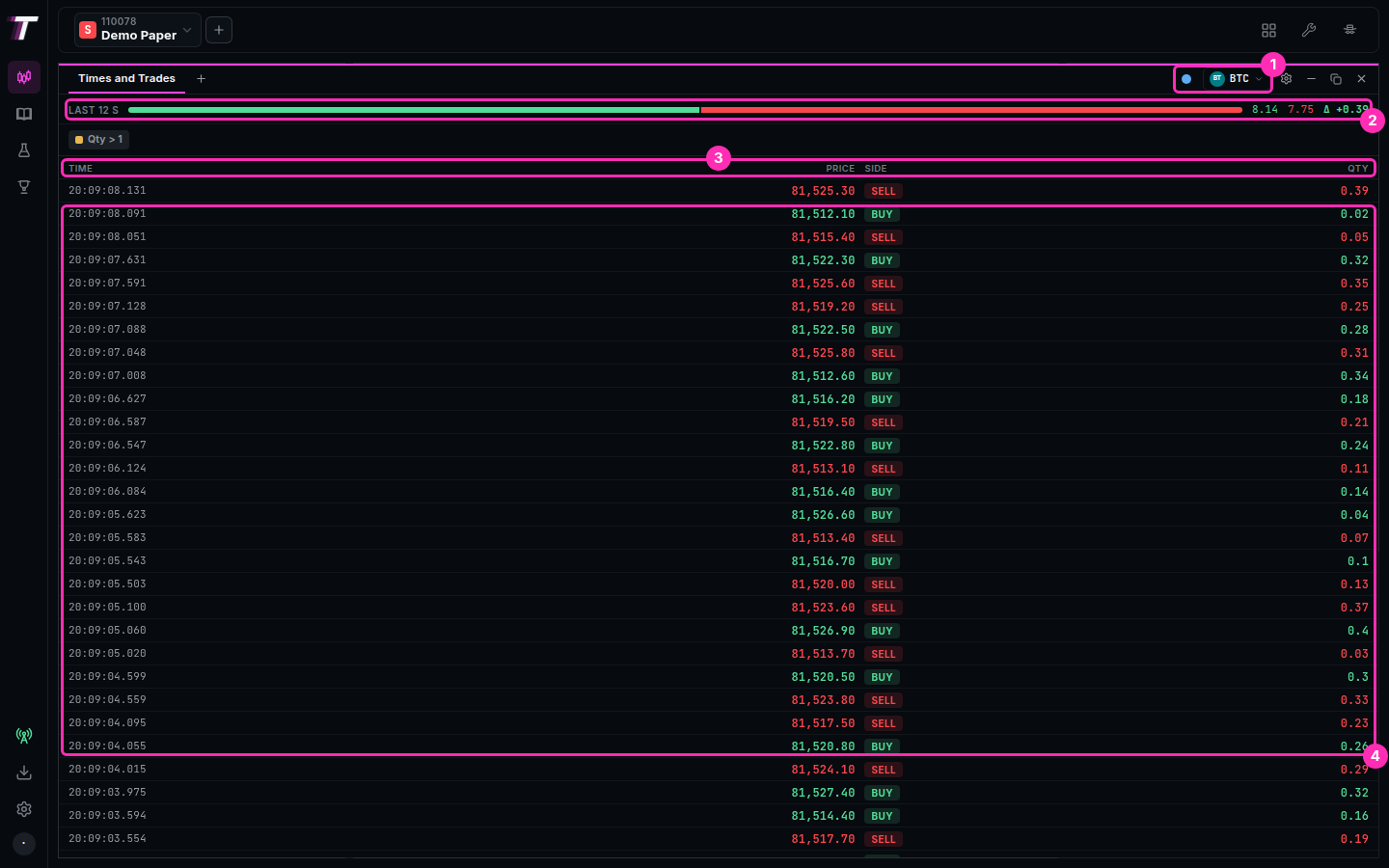
1 Symbol header · 2 Flow of the last seconds · 3 Columns · 4 Trades by aggressor
Above the columns, the flow bar (Last N s) compares the volume bought and sold in the last seconds and shows the difference (Δ). Below it, chips list the Active rules of quantity coloring and filtering (for example Qty > 1).
Columns
| Column | What it shows |
|---|---|
| Time | Execution time, to the second; Show milliseconds adds the precision |
| Price | Execution price |
| Side | Aggressor, the side that took liquidity: Buy (market buyer) or Sell |
| Position | What the aggressor did to its position: OPEN LONG, OPEN SHORT, CLOSE LONG, CLOSE SHORT or FLIP; only where the venue publishes it |
| Qty | Trade size |
| Buyer / Seller | Brokerages of the trade, when the market reports them |
Labels shorten as you narrow the column (for example, Buyer, Buy, B). Drag the header edge to resize and drag the header to reposition. Large trades (flagged BIG or SWEPT) appear as a card with the quantity highlighted. A trade where the same wallet is both buyer and seller is marked SELF.
Tip: the Buyer and Seller columns only show up on markets that report brokerages. "Blind" markets do not carry that information.
Colors and quantity filter
In Times and Trades settings:
- General — visible Columns, Show milliseconds and Self-trades (Show, Dim or Hide the SELF trades).
- Quantities — Coloring by quantity rules: you set a Rule (Equal to, Greater than or equal to, Less than or equal to, Greater than, Less than, Between), the Lot and the Color (Auto follows the aggressor). In the Filter section, Filter trades by lot hides trades that do not meet the rule.
- Colors — Highlight last trade and Last trade color, Color by aggressor, Buy aggressor color, Sell aggressor color, Other trades color and Where to apply the aggressor color (Color aggressor column only, Whole row or Color font).
With the lot filter you see only the relevant lots.
History and states
Use Load more at the end of the list to fetch earlier trades. Before the first trade arrives you see Awaiting trade prints….
Important: not every venue has a trade tape. Today LSE does not offer this stream, and the tool does not show made-up data in those cases. See Markets, venues and symbols.
Frequently asked questions
What is the aggressor? It is the side that crossed the spread to execute. A market buy is a buy aggressor and consumes resting sell liquidity.
Why do I not see Buyer and Seller? The symbol's market does not report brokerages.