Volume at Price
Volume at Price shows how much was traded at each price level during the session. High-volume levels show where the market accepted price; empty levels show where price moved through quickly.
Where to find it
Add the tool from the picker (Add tool > Volume at Price). The gear opens Settings — Volume at Price. It follows the active chart; with no active chart you see Select an active chart. See the Tools catalog.
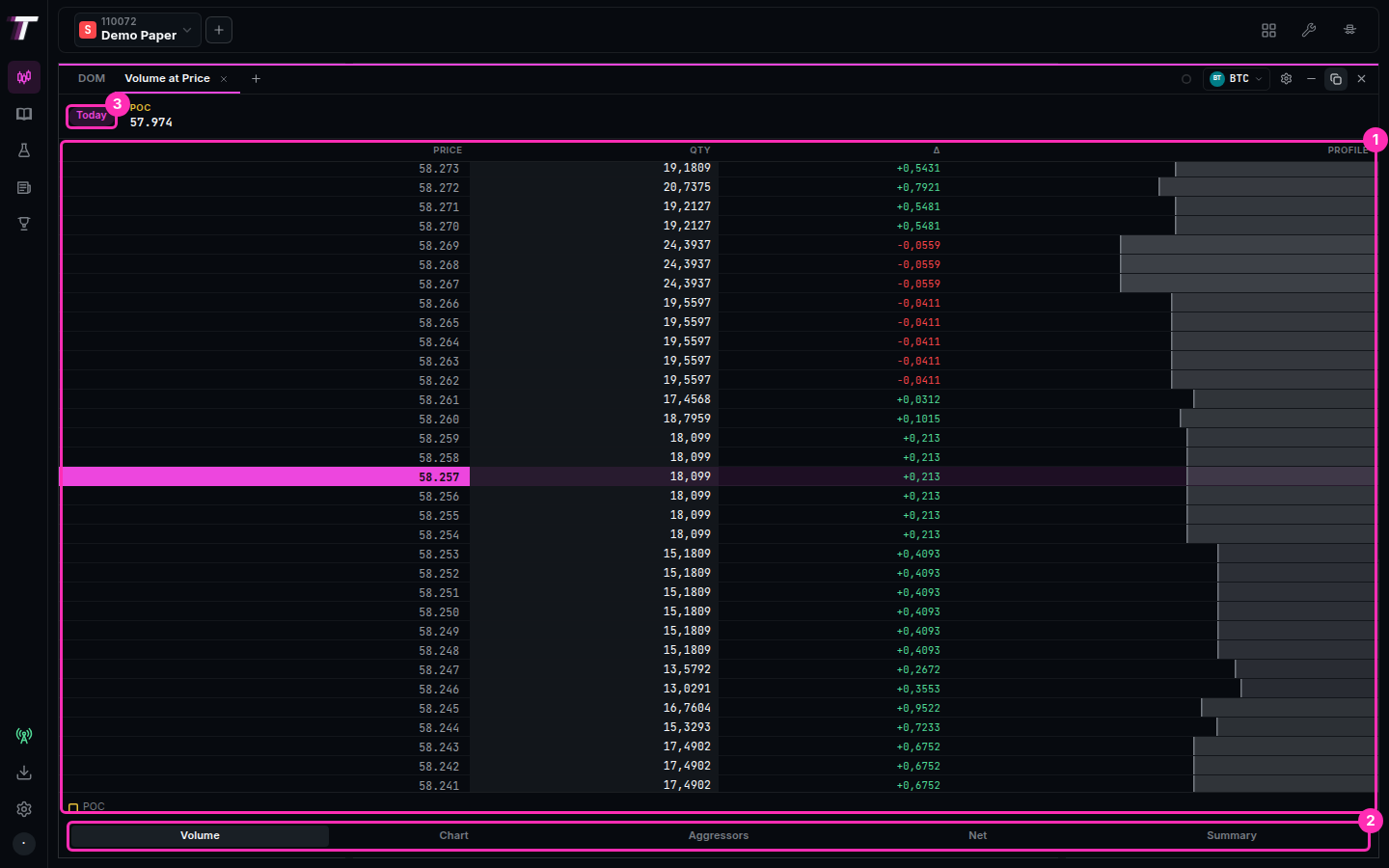
1 Volume bars by level · 2 Views · 3 Session tag
What the tool shows
- Columns — in the Volume view, Price, Qty, Δ (buy minus sell volume at the level) and Profile, whose bar grows from the right edge with the level's volume. A row above the columns pins the POC, VWAP, VAH and VAL.
- Views — the footer selector switches between Volume (classic table), Chart (full-width profile), Aggressors (mirrored buy and sell), Net (net difference) and Summary.
- Reference markers — OPEN, HIGH, LOW, PREV (previous close) and R24 (24h ref.), each with its own color.
- QTY — the level quantity, in Block or Heatmap style (heat: the more volume, the stronger the color).
- Value area — the band holding most of the volume, with VAH (top) and VAL (bottom). You adjust the Value Area coverage (%). The highest-volume level is the POC.
- Last price, VWAP and Position (the average price of your position) appear as highlighted lines.
Paint styles
In the Volume view, under Paint, Default draws one bar per level sized by total volume. By aggressor splits the bar between buy and sell volume. Price grouping aggregates levels (0 uses the asset's native tick).
Session summary
The Summary view gathers Price (Traded high, Traded low), Volume (Total volume, Buy, Sell, Net delta, No aggressor, Coverage), Traded levels and the value area (VAH and VAL).
Session and states
The session tag shows Today. If you opened the tool in the middle of the day, you see Partial: the profile does not cover the whole session, because volume is accumulated from what the platform received. Meanwhile you see Accumulating session volume….
Important: Volume at Price depends on the venue's trade stream. Today it works on Hyperliquid, Aster, Futures, B3 and T4, depending on what your operator has enabled. On the others, the tool says Volume at Price is not available for this venue.
Frequently asked questions
Does the volume match the chart's? The profile accumulates the trades received during the session; Partial sessions can differ from the day's total volume.
Is it the same as the Volume Profile indicator? No. This is its own tool, next to the chart; the chart indicator is a different feature.