Volume at Market
Volume at Market is a ladder that brings together, at each price, what is in the book now, what just changed in the book, the volume traded in the session and the liquidity that was replenished in the queue. It helps you see whether a large offer is being held, consumed or replenished.
Where to find it
Add the tool from the picker (Add tool > Volume at Market). The gear opens Volume at Market settings. It follows the active chart; with no active chart you see Select an active chart. See the Tools catalog.
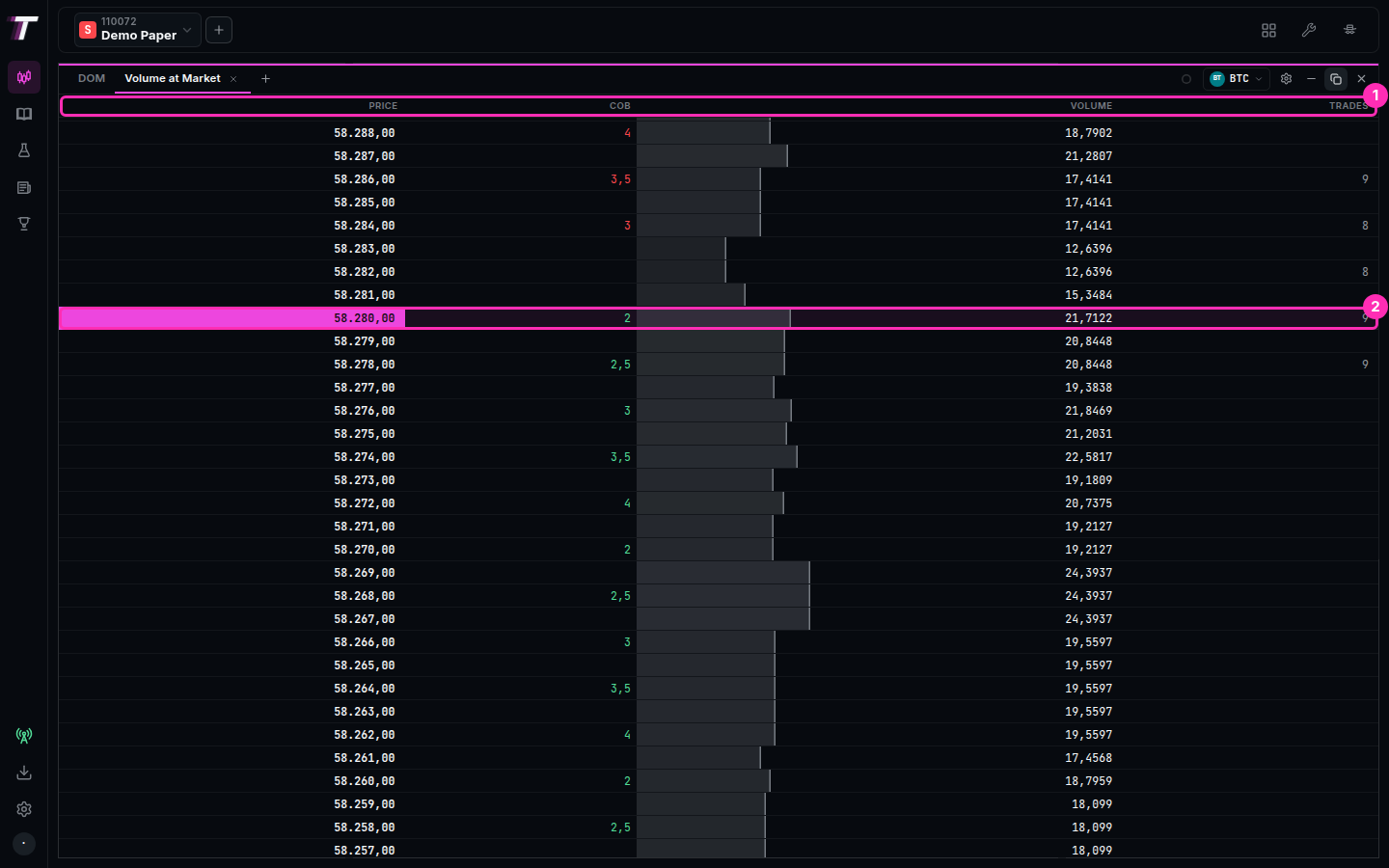
1 COB, Volume and Trades columns · 2 Last price row
The columns
| Column | What it means |
|---|---|
| COB | Resting quantity at that price now, summed over the book orders published. Blank outside the window the venue publishes. |
| +/- | Most recent change in the book quantity at that level, on the side the row shows. It fades out (+/- fade). |
| Volume | Cumulative volume traded at the price (buyer and seller with their own colors). |
| Queue renewals | Liquidity replenished at that price since the tool was opened. |
| Trades | Trades at each price since the tool was opened. |
Important: Queue renewals is not executed volume. It is new liquidity placed in the book. The header total is the sum of the levels still tracked, and counting starts when you open the tool, not at the start of the session.
Reading limits
Renewals come from comparing successive snapshots of the book. So an order posted and fully consumed between two snapshots does not appear, and prices outside the window the venue publishes are not counted. When the source indicator is on, it tells you whether each renewal comes from an individually identified order.
Queue renewals and +/- need a per-order book with order identifiers. On venues that publish only the book by price, such as Hyperliquid, the tool shows COB, Volume and Trades and leaves those two columns out instead of estimating them. On a venue without a book or a trade stream, the tool says that Volume at Market needs a per-order book carrying order ids, which the venue does not publish. While the book has not arrived, you see Awaiting per-order book….
Settings
In Volume at Market settings:
- General — Keep price centered, Columns (COB, Renewals, Volume, +/−, Trades), Display (Proportional bars, Renewal source & scope indicator, +/- fade, Highlight the last price row) and Session.
- Quantity — Color by quantity, applied to the cumulative volume traded at the price.
- Colors — colors of the buy and sell COB, buy and sell renewals, buy and sell volume and the positive and negative +/- value.
- Reset session — clears the live session counters now. Runtime only; not saved in presets.
Frequently asked questions
How is it different from Volume at Price? Volume at Price shows only what was traded. Volume at Market adds the live book and liquidity replenishment.
Does it work on any venue? It needs the venue's book and trade stream. Queue renewals and +/- also depend on the venue publishing the per-order book with identifiers.