News and economic calendar
The News tool shows headlines as they come in, each with a link to its source. The Economic Calendar tool and the News page gather the scheduled events of the week.
Availability: News is off by default and depends on your platform/operator, because the feed only exists where the operator configured it. If the feature does not appear, or if you see The news feed is not configured for this deployment., your platform has not enabled it.
Where to find it
Add the News or Economic Calendar tool from the picker (Add tool > News), or open the platform's News page. The page has two views, switched at its foot: Overview (headlines per hour, the Headlines list and the Economic calendar of the picked day) and Full calendar (the whole week as a table). See the Tools catalog.
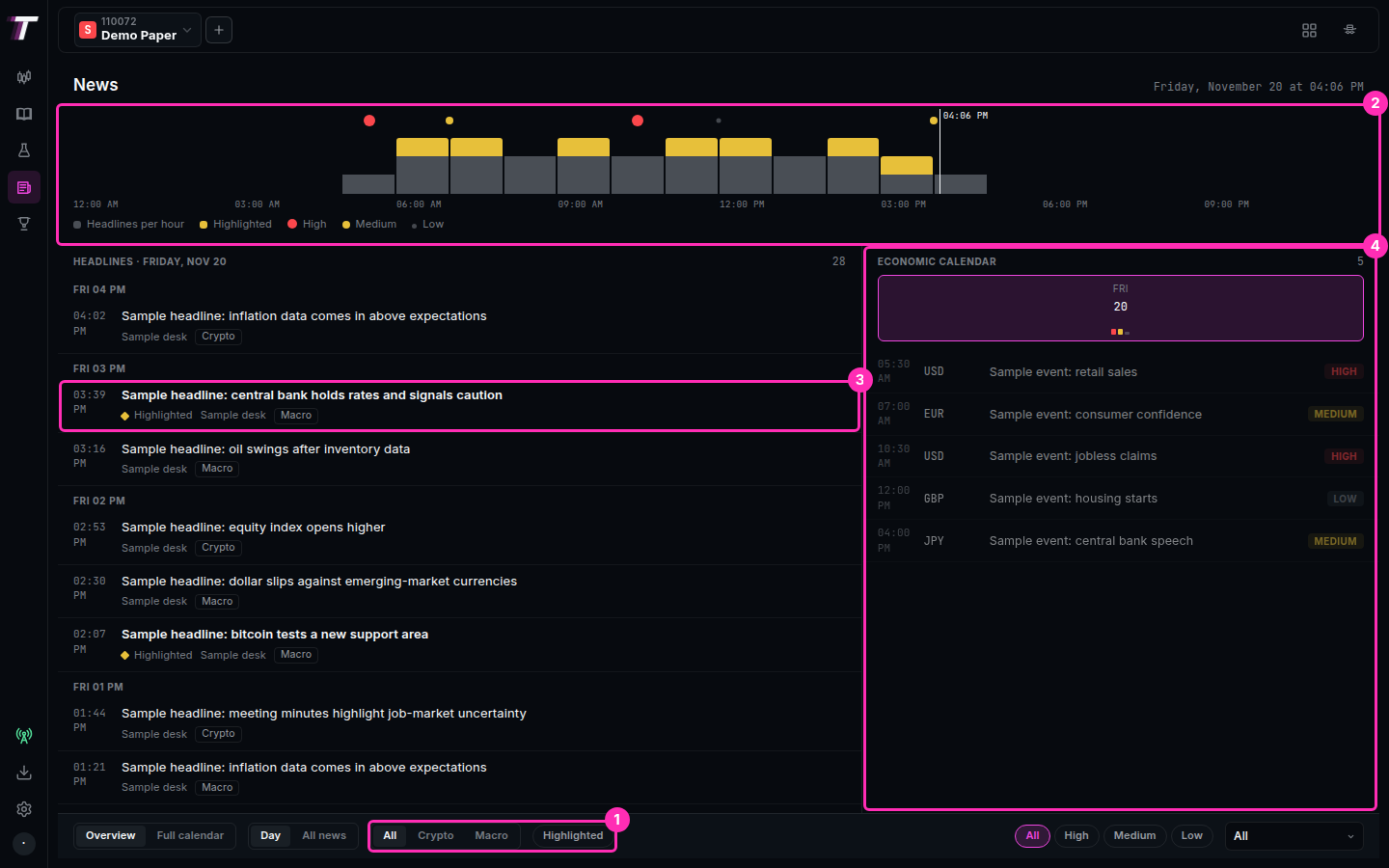
1 Highlighted and topic switches · 2 Headlines per hour · 3 Highlighted headline (sample data) · 4 Economic calendar (sample data)
Reading the feed
- New stories — they enter at the top as they arrive.
- Highlighted — important stories carry the Highlighted mark. In the tool, the chips at the foot are All, Highlighted and My symbols (stories about the symbols in your open watchlists or positions).
- Read at {source} — the link in each story's detail, which opens the publisher's page. A story with audio has a player in the same detail.
- Row density — in News settings, choose 1, 2 or 3 lines per headline. The same window has Highlighted only and Trade buttons.
- Trade {symbol} — a button per symbol a story names, which opens it in the tool's link group.
- Load more — fetches earlier stories. In the tool, stories are grouped by time (Last 15 minutes, Earlier today, Yesterday, earlier dates).
- New stories while you read history — when you scroll back, the feed pauses so it does not push what you are reading, and shows a notice such as "2 new stories"; click it to return to the top.
- All symbols — the symbol filter in the tool's bar narrows the list to one symbol.
On the page's Overview, the foot has Day / All news (the picked day or the whole archive), the topic All, Crypto or Macro, the Highlighted chip and the calendar's impact and currency filters. The Headlines per hour bars narrow the list to one hour.
Without an account
Signed-out visitors see only three sample headlines, without the full text and without live updates, with the invitation Sign in to read the full stories and get them in real time. The full archive and real-time delivery require an account.
Economic calendar
The calendar lists the scheduled economic events of the current week, with Time (UTC), Currency (with its flag), Event and Impact (High, Medium, Low), and Actual, Forecast and Previous where the window is wide enough. Filter by impact and currency; Clear filters resets them. In the page's Overview, a Week strip picks the day.
States
- Couldn't load the news. — the feed failed to load; use Try again.
- No news yet. — the feed is empty right now.
- No highlighted posts in this window. — the Highlighted filter found nothing.
- No headlines here — nothing on the page for the day, hour or topic you picked.
Frequently asked questions
Why do I only see three headlines? You are signed out. Sign in to your account to see the full feed.
Do the news change my active symbol? Only if you click Trade {symbol}, which opens that symbol in the tool's link group. The All symbols filter only narrows the list.