Platform overview
Tron Charts is a trading platform that runs in your browser: charts, orders, order book, journal and risk management in a workspace you arrange yourself. You can also install it as an app (PWA), with no program to download.
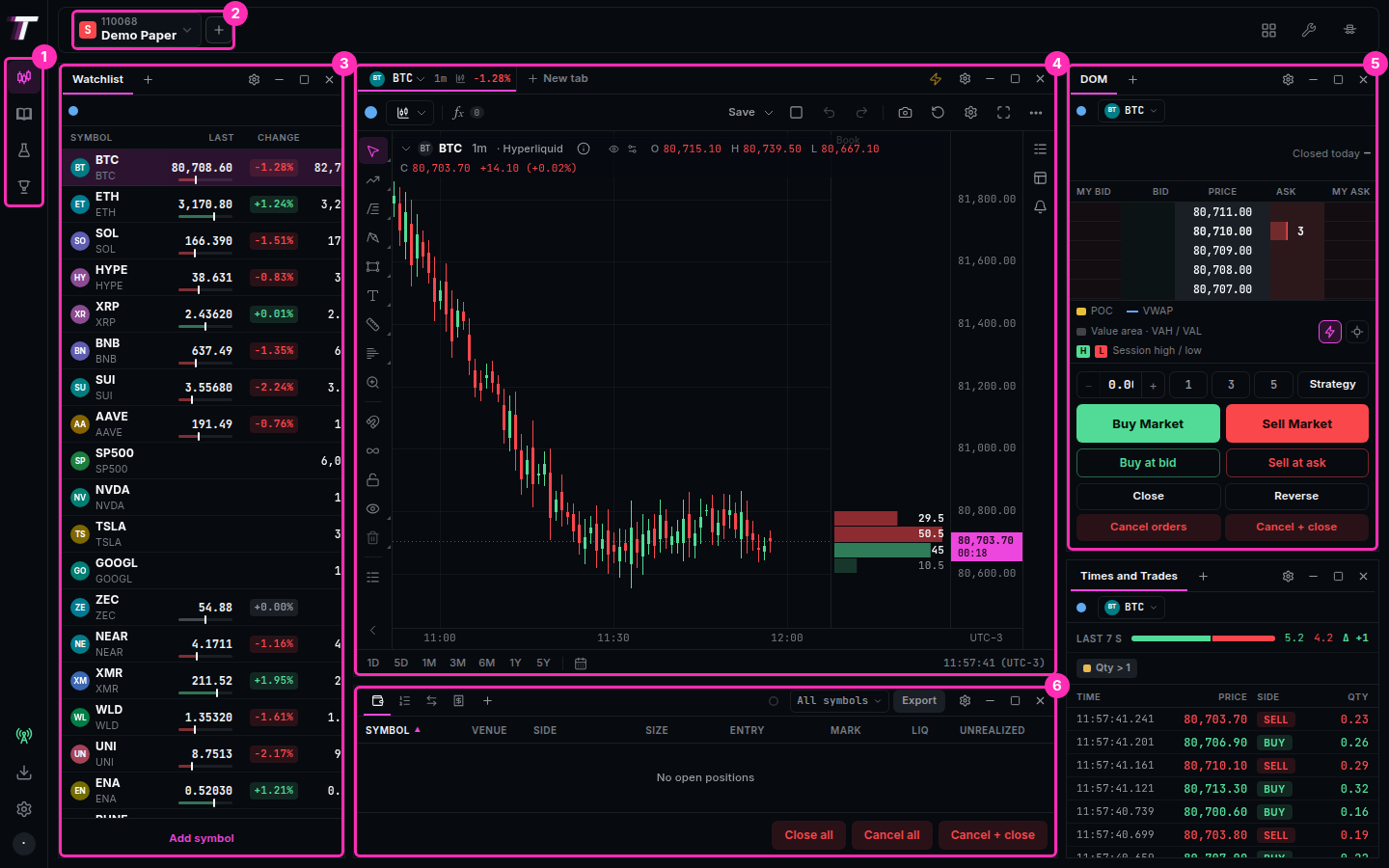
1 Sidebar · 2 Account selector · 3 Watchlist · 4 Chart · 5 DOM and order pad · 6 Positions
Where to find it
Open your operator's platform address. The left sidebar lists the modules; Settings sits at the bottom of it. On a phone, modules live in the bottom bar and in your profile menu (see Mobile interface).
What you get
- Trade — the workspace with charts, order pad, DOM, positions and other tools.
- Journal — automatic record of your trades, with metrics and review.
- Rewards — goals and benefits offered by the platform.
- Lab — integration and assistant features, such as MCP access.
- Jesse — the platform's AI assistant, opened from the icon in the header.
- Funded, News and Copy — optional modules that appear only if the operator turned them on.
Availability: each operator turns modules on or off and sets the theme (colors and logo). What you see in the sidebar may differ from what another operator offers.
Markets and execution
The platform brings together markets from several sources: perpetuals, prediction markets and futures. The exact list depends on the operator; see Markets, venues and symbols. Today, live execution exists only on Hyperliquid and Aster, and real-account trading is marked Soon. You trade on paper accounts, with a simulated balance and no risk; see Paper vs live accounts.
Languages and devices
- Languages — English, Português and Español, chosen in Settings > Profile > Language.
- Devices — the layout adapts to phones and to tablets in portrait.
- Your layouts — workspaces are saved in the device's browser and do not sync across devices.
Frequently asked questions
Do I need to download anything? No. Use it in the browser or install it as an app, as described in Install the app (PWA). There is no native desktop app.
Can I trade with real money? Not yet. Real accounts are locked and show as Soon.
Does my layout follow me to another computer? No. It stays on the device where you created it.