Super Charts drawing tools
Super Charts has its own drawing rail, with 8 groups of tools. Almost every tool can be used; the only one still marked Coming soon is Anchored delta.
Where to find it
On the drawing rail, to the left of the chart (Drawing tools). Each button opens a group: Cursors, Lines, Fibonacci, pitchforks & Gann, Patterns, Shapes, Annotations, Measure & positions and Order flow tools. If the rail is hidden, show it in Chart settings, Visibility tab (Show drawing sidebar).
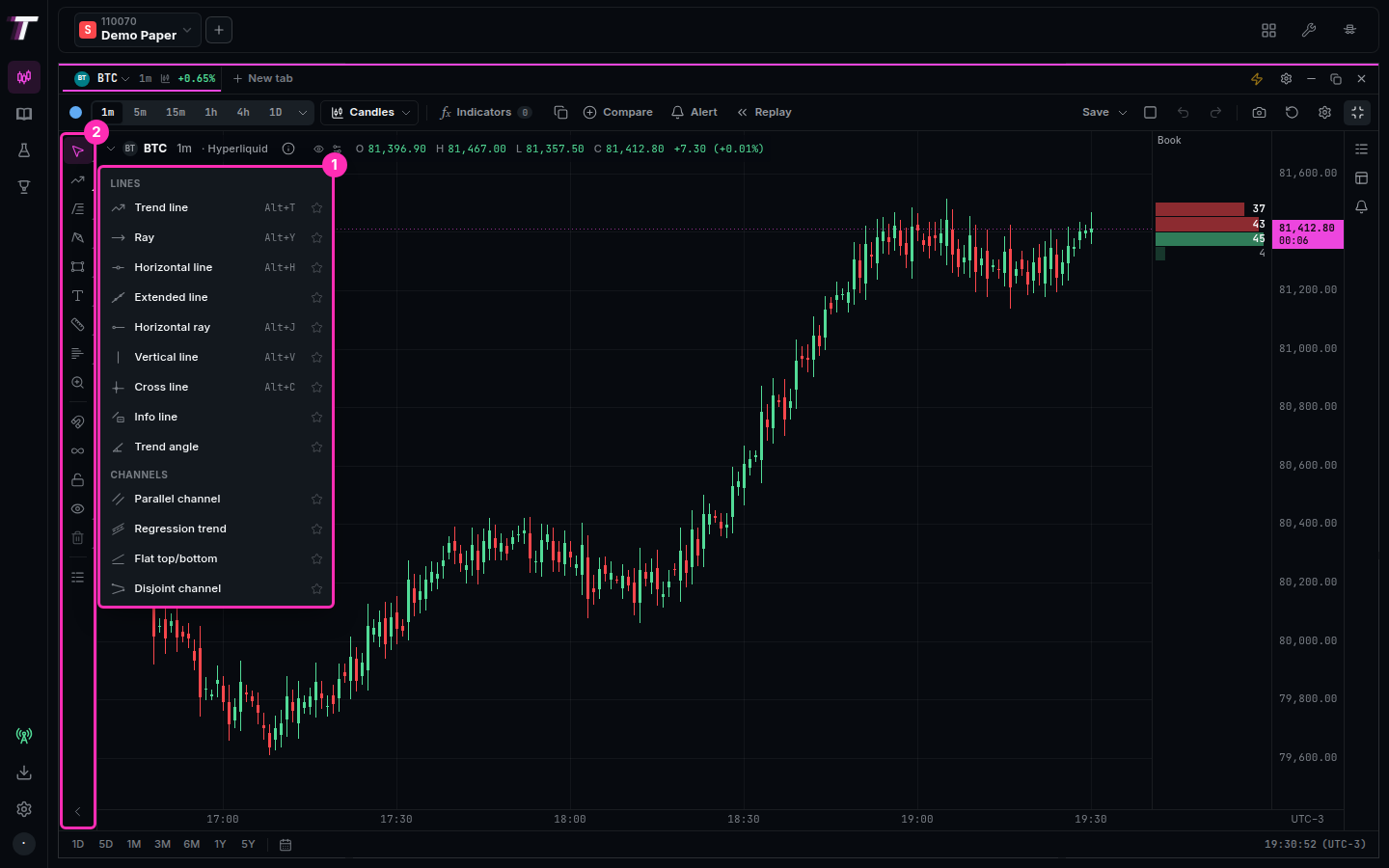
1 Lines group open · 2 Drawing rail
Available tools
| Group | Examples |
|---|---|
| Cursors | Crosshair (Esc), Dot, Arrow, Eraser |
| Lines | Trend line (Alt+T), Ray (Alt+Y), Horizontal line (Alt+H), Horizontal ray (Alt+J), Vertical line (Alt+V), Cross line (Alt+C), Parallel channel, Regression trend |
| Fibonacci, pitchforks & Gann | Fib retracement (Alt+F), Fib extension, Pitchfork, Gann fan |
| Patterns | XABCD pattern, Head and shoulders, Elliott waves, cycles |
| Shapes | Rectangle (Alt+G), Circle, Ellipse, Path, Brush, Highlighter, arrows |
| Annotations | Text, Note, Callout, Price label |
| Measure & positions | Measure (Alt+M), Price range, Date range, Long position, Short position |
| Order flow tools | Fixed range volume profile, Anchored VWAP; Anchored delta is Coming soon |
How to draw
- Pick the tool (or use its shortcut).
- Click the chart to place the first point; for two-point tools, click again. Esc cancels.
- Click the drawing to select it. The drawing bar offers Line colour, Fill, Line width, Line style (Solid, Dashed, Dotted), Lock, Clone, Hide, Remove, Bring to front and Send to back.
- Settings… opens a window with the Style and Coordinates tabs, to adjust the price and time of each point.
With a drawing selected, arrow keys move it 1 bar (left/right) or 1 price step (up/down), and Delete or Backspace remove it. A locked drawing cannot be moved or removed until you unlock it. Ctrl/Cmd+Z undoes and Ctrl/Cmd+Shift+Z redoes.
Rail options
- Snap to bar OHLC — a magnet that sticks points to open, high, low or close.
- Keep tool after drawing — on or off.
- Lock all drawings — on or off.
- Hide drawings / Show drawings.
- Remove all drawings ({count}).
Each tab holds at most 500 drawings. At the limit, the chart warns you and asks you to remove some.
On mobile
The quick bar offers Pan, Trend, Ray, Level, Box, Fib and Measure, plus the Lock, Snap, Keep, Hide and Clear switches.
Frequently asked questions
Are my drawings saved? Yes, with the Super Charts tab, on your device.
Can I mark tools as favorites? Yes, the available ones (except cursors) get a star and stay at hand on the rail.