Funded account dashboard
The dashboard shows the state of your funded account in real time: equity, rule meters, status and actions such as claim or quit. Activating or cancelling a challenge is done in the detailed view opened from the Funded accounts drawer.
Availability: Funded depends on your platform and operator.
Where to find it
- Funded > My Account: the My challenges list (All your prop accounts across every firm on TRON), with Challenge, Status, Size, Tier, Claimable, Started and the Open button. Use + New challenge to go to the catalog.
- Click Open to see an account's dashboard.
- Funded accounts drawer: when you have at least one prop account, a tab with an arrow appears on the right edge of the screen. It opens the drawer with the active account and your other accounts; click an account to open its detailed view, which has the Agree & activate and Cancel challenge buttons.
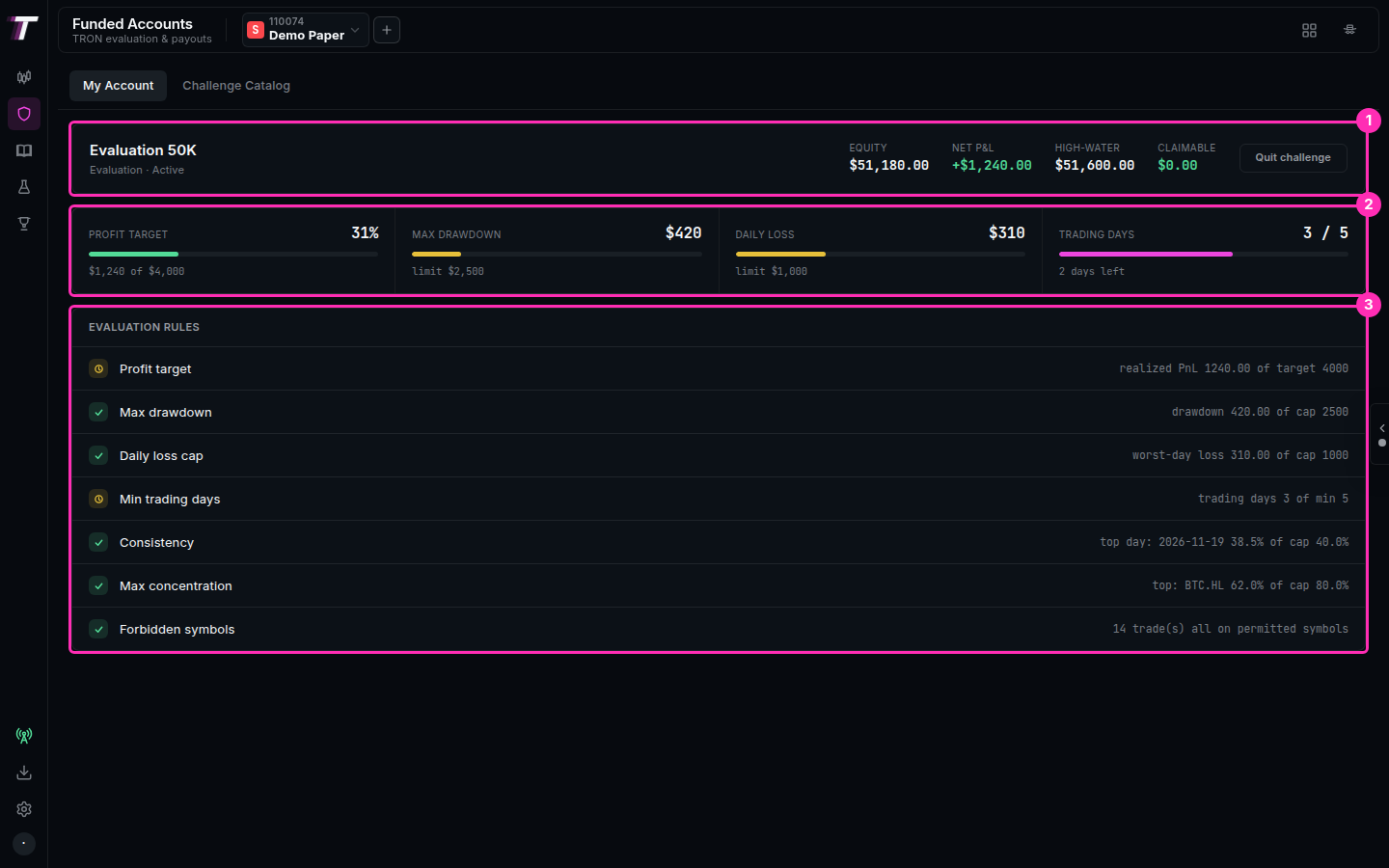
1 Account summary · 2 Meters · 3 Evaluation rules
What the dashboard shows
- Equity, Net P&L, High-water and Claimable.
- The meters Profit target, Max drawdown, Daily loss and Trading days (amount used out of a target, limit and days left).
- The Evaluation rules section, with the status of each rule. Before the first evaluation it shows "No rules evaluated yet — the engine hasn't scored this account."
- Next to the account name, the phase and status (for example, Evaluation · Active or Flash · Active).
- The detailed view (from the Funded accounts drawer) also shows Program, Started and Expires.
Challenge status
| Status | Meaning |
|---|---|
| Pending payment | Waiting for the stake deposit to be observed on-chain. |
| Pending agreement | The agreement still needs accepting. This dashboard has no button for it: open the account from the Funded accounts drawer and use Agree & activate or Cancel challenge. |
| Active | You can trade; the rules are being evaluated. |
| Passed | Conditions met; there is an amount to claim. |
| Paid out | Payout completed. |
| Breached | A rule was broken; account closed. |
| Expired | The deadline passed. |
| Cancelled | You cancelled before activating. |
Actions
- Claim payout (when the account is Passed) — see Payouts. In the detailed view the button is Claim {amount}.
- Quit challenge (when the account is Active) — see Breach, quit and expiry.
- Agree & activate — only in the detailed view from the Funded accounts drawer, on an account in Pending agreement; signs the agreement and puts the account live.
- Cancel challenge — only in the detailed view from the Funded accounts drawer, while the account is not closed; irreversible, progress toward a payout is lost.
Common notices
- Setting up your venue credentials… (detailed view) — trading is enabled when provisioning finishes.
- Venue credentials failed to provision (detailed view) — trading stays blocked until it is resolved; contact support if it persists. See Contacting support.
- Deposit in flight — the deposit has not been seen on-chain yet; it usually clears within a minute or two. Use Refresh.
Frequently asked questions
Do the numbers update on their own? Yes, the dashboard receives live updates; use Refresh if something looks stuck.