Journal overview
The Journal is your trading log inside Tron Charts. It automatically gathers the closed trades from your accounts, calculates metrics, and lets you write down what happened, plan the session and follow your process rules.
Where to find it
Journal in the sidebar (route /journal/workspaces). You must be logged in. The Journal opens on a strip of workspace tabs: Today, Trades, Calendar and Insights. Each workspace is a board of tools. The New journal workspace button adds a New workspace or a New from template, up to 8 workspaces; they are saved in this browser. The gear at the end of the strip opens Journal settings, with Tags, Tag types, Tag groups and Rules.
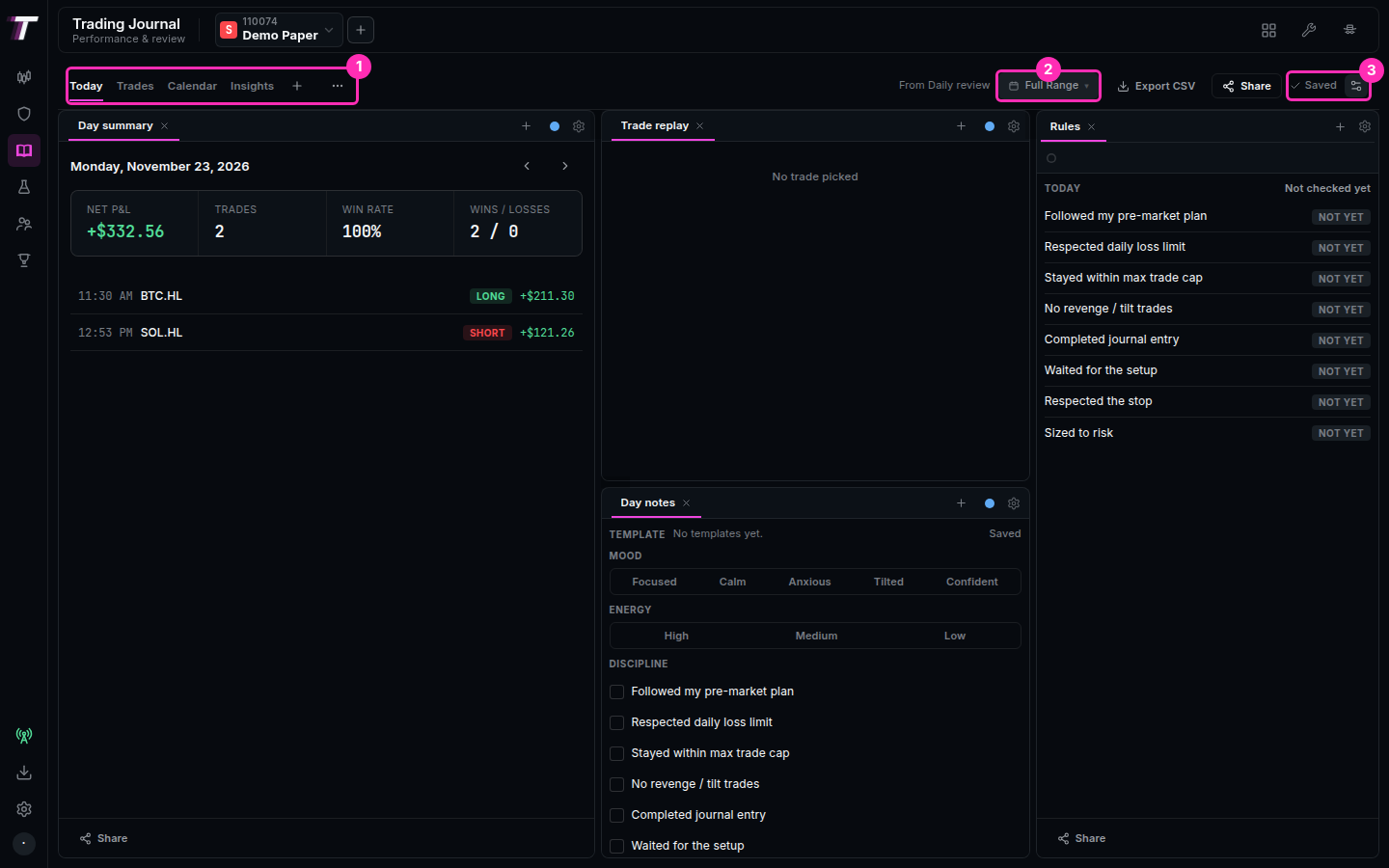
1 Workspace tabs · 2 Period · 3 Save status and Journal settings
What the Journal records
- Closed trades — rebuilt from your fills on the selected accounts, with no typing. Each trade is a complete operation, from entry to exit.
- Notes and review — day notes (mood, energy, checklist and notes) and per-trade review (thesis, lesson, mistakes, rating, setup tags), kept in your account. A Saved / Saving / Offline / Not saved indicator on the strip shows the state of the last changes.
If there are no trades, the Journal shows "No trades yet." Trade on an account and the closed trades appear on their own.
When you close a paper position, a Trade closed · {symbol} notice offers Review to write the trade up right away or later. You turn it on or off with Ask to review a trade when a paper position closes in Settings > Trading.
Workspaces and tools
Each workspace holds tools such as KPI strip, Equity, Trade log, Trade review, Month calendar, Day notes, Notes and Goals. Add one with Add a tool. See Workspaces and tools.
- Notes and Note templates — rich-text editor and note templates. See Notes, tags and attachments.
- Rules — your process rules, ticked day by day; the journal measures what the account did, the rules measure what you did.
- Goals, Setups and Daily plan — goals, trade plans and the plan of the day.
- Journal settings — Tags, Tag types, Tag groups and Rules, to classify trades and notes.
Old links to Dashboard, Review, Calendar, Reports, Progress, Notes, Tasks, Habits, Planning and Tags open the matching workspace or tool.
Scope and period
At the top, choose where the data comes from and the analysis window:
- Scope — the account switcher in the header says Journal shows N: tick the boxes of the accounts to include, or choose Only {name} for one. Paper and live accounts can be analyzed together.
- Period — Today, Yesterday, Last 7 Days, This Month, Last Month, Last 6 Months, This Year, Last 1 Year, Full Range, Challenge or Custom Range (with Apply and Lock Range?).
- Export CSV and Share on the strip export or share the period. See Trade cards and sharing.
Frequently asked questions
Do I need to log every trade? No. Trades arrive on their own; you only add context.
Does the Journal work with Funded accounts? Yes; the Challenge period helps you look at one challenge only.
What if my browser and my account disagree? A banner says "{n} journal items differ between this browser and your account"; choose Keep account or Keep this browser for each one.