Lab: MCP and API keys
The Lab lets you connect a paper (or prop) account to an MCP-compatible AI client — such as Claude Desktop, Claude Code, Cursor or Cline — using an API key of your own or by approving a connector in the browser. Access is limited by tier, risk limits and a kill switch.
Where to find it
- Lab > MCP (API credentials for MCP clients).
- Settings > Trading agents > API clients: lists the same credentials.
- The remote-connector approval screen: Connect an MCP client, opened by your client (route
/oauth/consent).
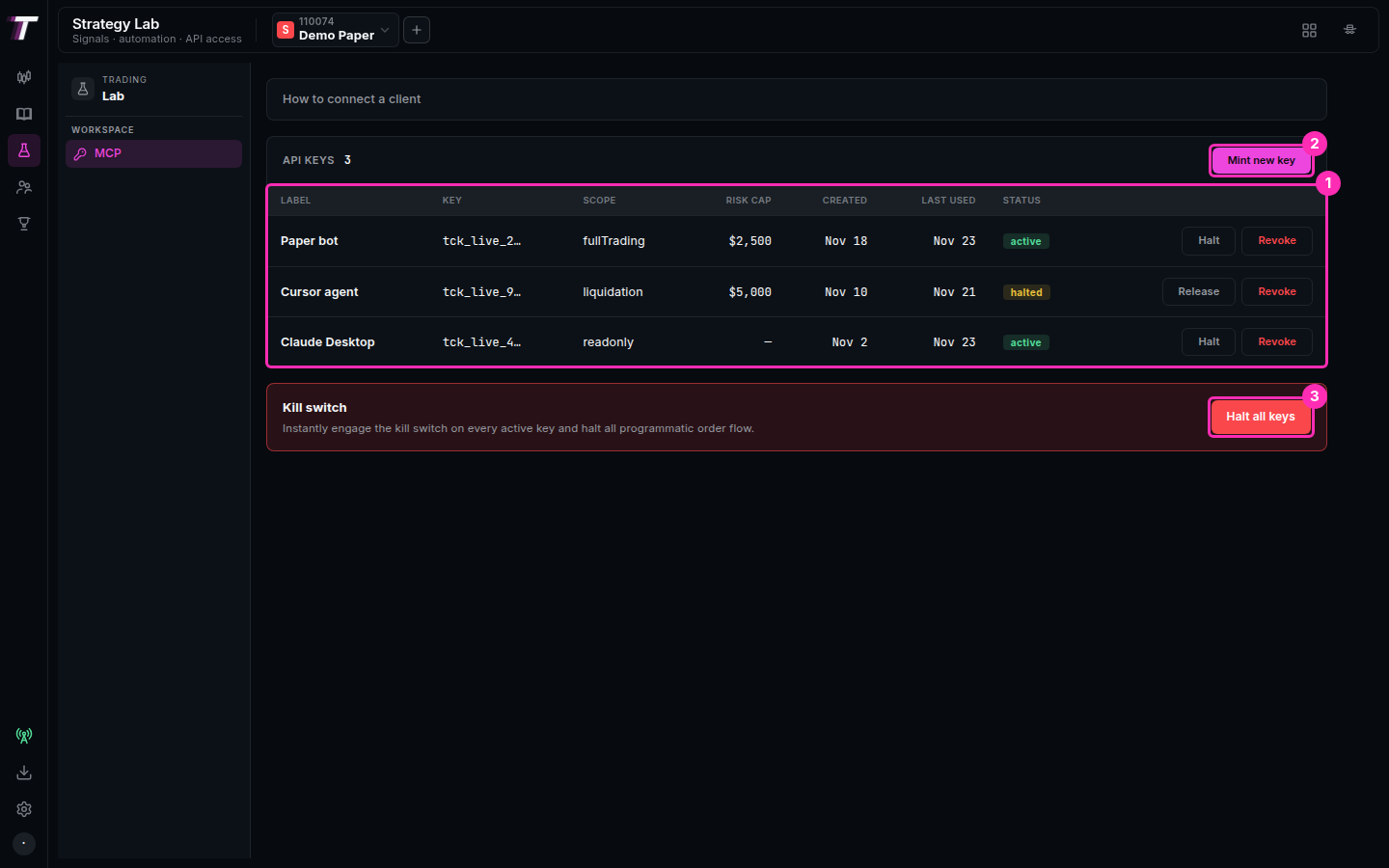
1 API keys table · 2 Mint new key · 3 Kill switch
Creating an API key
- Under API keys, click Mint new key (Mint credential).
- Enter the Name and, if you want, a Description.
- Choose the Tier (access level), the Venue and the limits.
- For paper accounts, click Create API key: no wallet is needed. Orders use the simulated account and its rules.
- Save the values shown (API key, API secret, Agent key). They appear only once and cannot be recovered; if you lose them, revoke and mint another. Confirm that you copied them.
- Pick your client, copy the config snippet and use Test connection.
Access tiers and limits
| Field | Meaning |
|---|---|
| readonly | Query only. The safe default. |
| liquidation | Query, plus cancel and flatten. |
| fullTrading | Query, cancel/flatten and placing orders. Requires a deliberate choice. |
| Max notional / order (USD) | Maximum size of each order sent by the key. |
| Daily loss cap (USD) | Maximum daily loss the key can generate. |
| Expires in (days) | Credential validity. |
The table shows Label, Key, Scope, Risk cap, Created, Last used and Status (active, halted or revoked).
Remote connector (OAuth)
In clients that accept a browser connector, add the Streamable HTTP URL and select OAuth. You approve on the Connect an MCP client screen: pick the Simulated account, set the Maximum position notional (USD) and the Daily loss limit (USD) and click Approve connection (or Deny). Approval creates a separate credential for that client, which stays valid until you revoke it under Lab > MCP. If the request expires, start again from the client.
Kill switch and revoking
- Halt blocks a key instantly; Release re-enables it.
- Halt all keys engages the Kill switch on every active key and stops all programmatic order flow.
- Revoke is permanent: the credential cannot be restored.
Important: treat keys like passwords. A fullTrading key can place orders on the account. Start with readonly and use low limits.
Frequently asked questions
Can I use it with a live account? Live accounts are coming soon.
What about the Lab's Python strategies, indicators and signals? They are not available. Today the Lab offers MCP and the Copilot.