Indicators overview
Indicators are calculations on price and volume, drawn on the chart to help you read trend, momentum and flow. The articles in this section are educational: they explain what each indicator measures and where to find it in Tron. No indicator predicts the market or guarantees a result.
Where to find it
- TradingView Charts — click Indicators & strategies on the symbol strip (or in the chart header) to open TradingView's indicator dialog. Parameters are editable in each indicator's dialog, and TradingView defaults may differ from Super Charts defaults.
- Super Charts — click Indicators on the chart toolbar or use Alt+I. Indicators are organized in All and the Favorites, Trend, Momentum, Volume, Volatility, Order flow and Your studies groups, with Search indicators.
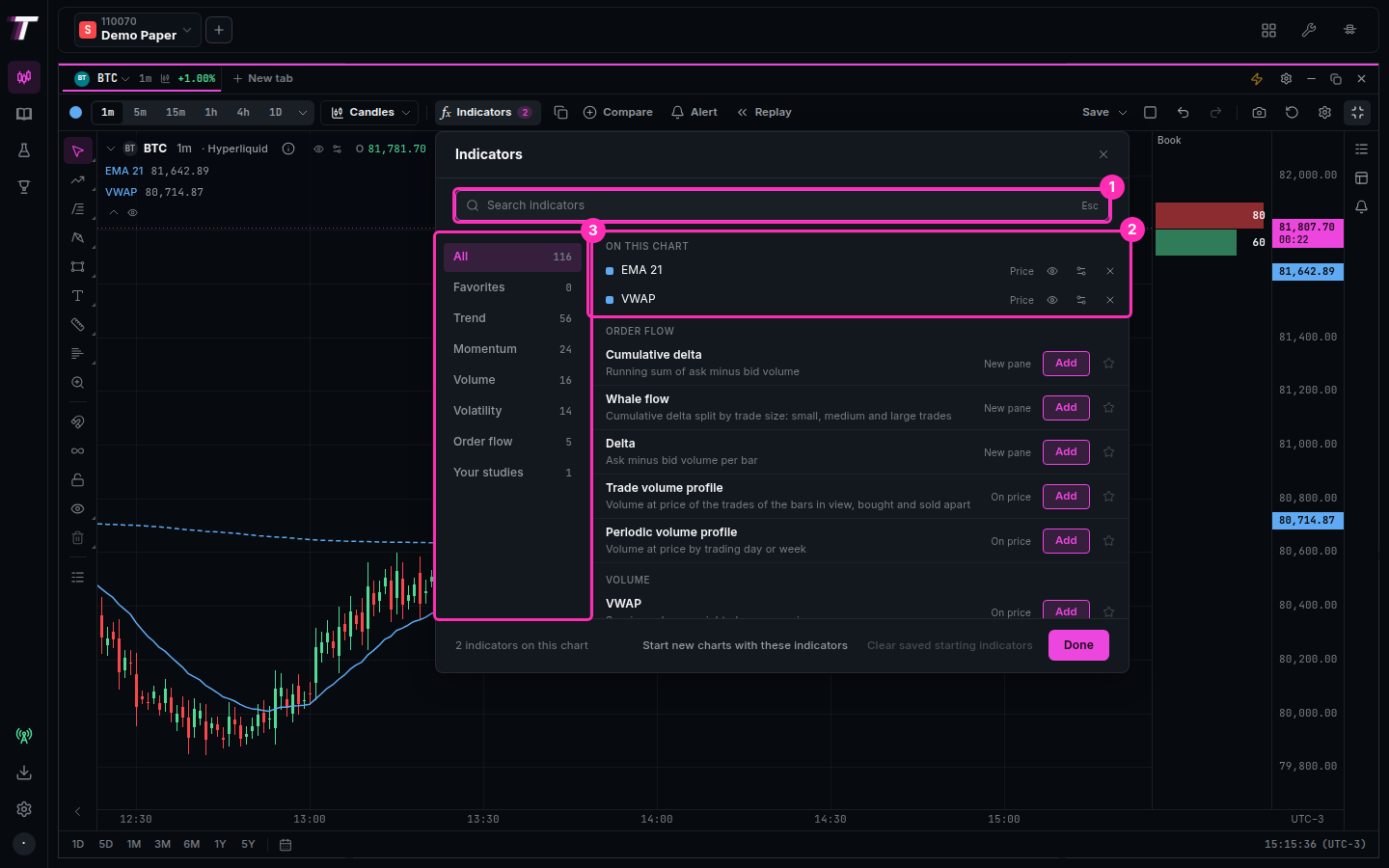
1 Search · 2 Indicators on this chart · 3 Indicator groups
Super Charts indicators
| Group | Indicators | Default |
|---|---|---|
| Trend | SMA, EMA, WMA, VWMA, SMMA, HMA, DEMA, TEMA, ALMA, LSMA, McGinley Dynamic, Bollinger bands | Periods from 7 to 50; see Moving averages |
| Momentum | RSI, MACD, among others | 14; 12 / 26 / 9 |
| Volume | Volume, VWAP, Visible range volume profile, Fixed range volume profile, Anchored VWAP, among others | VWAP restarts every day |
| Order flow | Cumulative delta, Whale flow, Delta, Trade volume profile, Periodic volume profile | Need the asset's trades |
How to add and adjust in Super Charts
- Open Indicators and pick one (or Add {name}).
- In {name} settings, adjust the Length (from 1 to 400) and the Source: Close, Open, High, Low, HL2, HLC3 or OHLC4.
- Choose Colour, Line width and Line style.
- Place it On price or in a New pane; you can move an indicator between panes.
A chart holds up to 12 indicators. At the limit, Super Charts asks you to remove one. A new chart starts with no indicators; Start new charts with these indicators makes the current set the starting one, and Clear saved starting indicators undoes it. The On this chart list shows what is active and lets you hide or remove it.
Custom indicators
The TradingView chart has a no-code builder, with limited availability in this version. See Custom indicator builder.
Frequently asked questions
Why does Delta show no values? It needs the asset's trades. See Delta.
Are defaults the same on both charts? Not always. On TradingView, edit the parameters in the indicator's dialog.